Feature Summary
The Age Group feature is used to collect respondents' age range information. With preset age interval options, it allows respondents to quickly select their age group, facilitating data statistics and analysis by age dimension.
Feature Description
| Feature Dimension | Description |
|---|---|
| Membership Restriction | No membership restriction |
| Version Restriction | No version restriction |
Operation Steps
Add an Age Group Question
Feature Entry
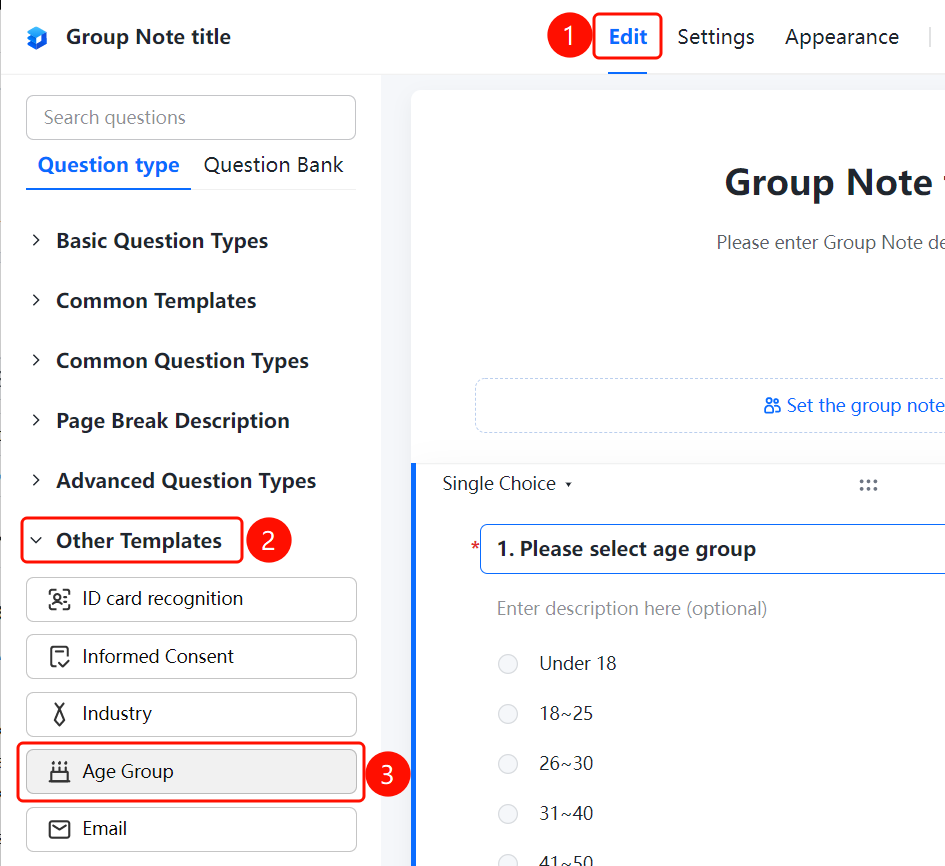
「Edit」tab → 「Common Question Types」 → 「Age Group」 button
- Click the top 「Edit」 tab
- Expand the 「Common Question Types」 area in the left panel
- Click the 「Age Group」 button to add the age group question to the Group Form
FAQ
Q1: What are the preset options for Age Group?
- Solution: The Age Group feature presets options such as 「Under 18」, 「18
25」, 「2630」, 「3140」, 「4150」, etc., which can also be custom modified.
Q2: Can the age group options be customized?
- Solution: Yes. Click the age group question, and you can modify or add age interval options in the option editing area.
Q3: What scenarios are age group questions suitable for?
- Solution: Age group questions are suitable for scenarios such as questionnaire surveys and user information collection that require statistics by age dimension.
Notes
- The age group question is a single-choice question type; respondents can only select one age interval
- Preset options can be custom modified according to actual needs