Feature Summary
The post-submission settings are used to configure the behavior after a respondent submits the form, such as generating a response QR code after submission, which can be used for scenarios like scanning to view submission details, scanning to check in, and scanning to supplement submissions.
Feature Description
| Feature Dimension | Description |
|---|---|
| Membership Restriction | No membership restriction |
| Version Restriction | No version restriction |
Operation Steps
Setting Post-Submission Behavior
Feature Entry
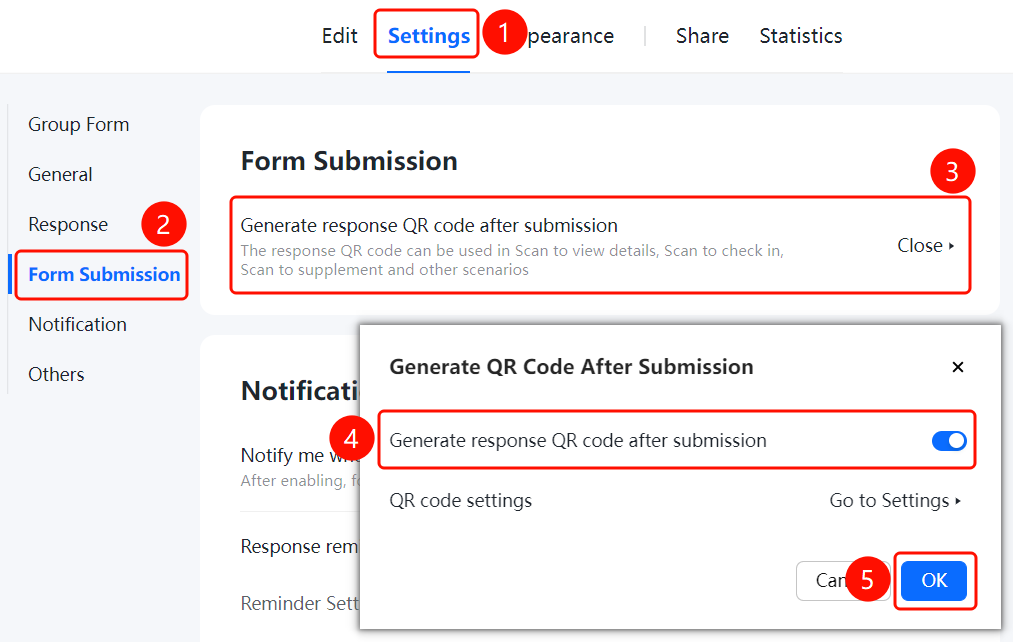
「Settings」 tab → 「Post-Submission」 tab → 「Post-Submission」 option
- Click the top 「Settings」 tab
- Expand the 「Post-Submission」 tab in the left panel
- Click the 「Post-Submission」 option to view configurable post-submission behaviors
FAQ
Q1: What is the use of generating a response QR code after submission?
- Solution: The response QR code can be used for scenarios such as scanning to view submission details, scanning to check in, and scanning to supplement submissions. Respondents can obtain the QR code after submission.
Q2: How to set whether the response content can be viewed after scanning the code?
- Solution: After enabling 「Generate Response QR Code After Submission」, you can configure whether scanning the code is allowed to view the response content in 「QR Code Settings」.
Q3: Can the settings be modified after submitting the form?
- Solution: Yes. You can modify the post-submission behavior configuration at any time in 「Settings」 tab → 「Post-Submission」.
Notes
- The response QR code makes it convenient for respondents to view their own submission details
- You can configure the scanning view permission as needed