Feature Summary
The data dashboard displays the statistical results of Group Form data in visual charts. It supports AI intelligent analysis, rich charts, and custom statistics to help you quickly gain insights into data trends.
Feature Description
| Feature Dimension | Description |
|---|---|
| Member Restrictions | No member restrictions |
| Version Restrictions | No version restrictions |
Steps
View Data Dashboard
Feature Entry
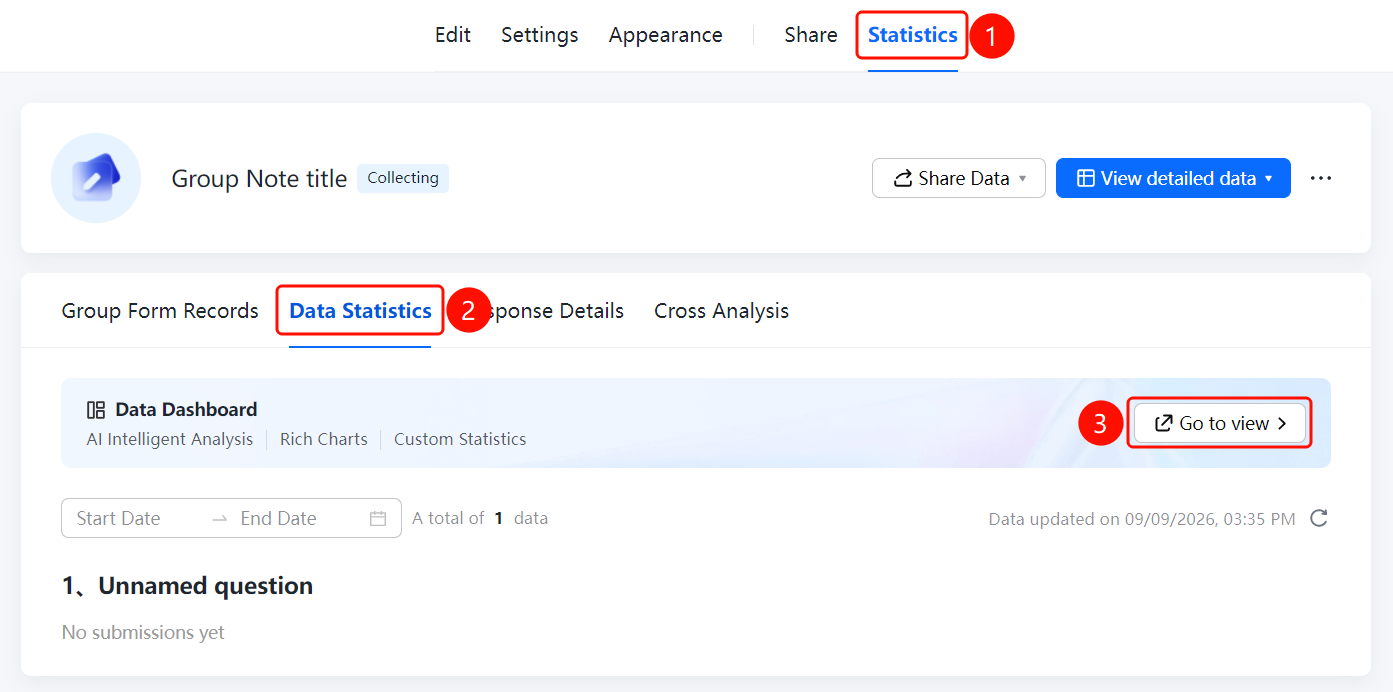
"Statistics" tab → "Data Dashboard" option
- Click the Statistics tab at the top.
- Click the Data Dashboard option in the left panel.
- Click View to go to the data dashboard page.
- In the data dashboard, you can view AI intelligent analysis, rich charts, and custom statistics.
FAQ
Question 1: What is the difference between the data dashboard and regular data statistics?
- Solution: The data dashboard displays data in visual charts and supports AI intelligent analysis and custom statistics, making it suitable for large-screen display and reporting scenarios. Data statistics focus more on viewing and exporting detailed data.
Question 2: What chart types does the data dashboard support?
- Solution: The data dashboard supports multiple chart types, including bar charts, pie charts, and line charts. It can automatically select the appropriate chart based on data characteristics.
Question 3: How do I customize the statistical content of the data dashboard?
- Solution: On the data dashboard page, click "Custom Statistics", and select the data dimensions and chart types you want to display.
Notes
- The data dashboard is suitable for large-screen display and reporting scenarios to visually display data trends.
- Filtering data by time range is supported.