Feature Summary
The title is used to set the name and description of the Group Form. When respondents open the Group Form, they first see the title and description, which helps them understand the purpose and filling requirements of the Group Form.
Feature Description
| Feature Dimension | Description |
|---|---|
| Membership Restriction | No membership restriction |
| Version Restriction | No version restriction |
Operation Steps
Setting the Title
Feature Entry
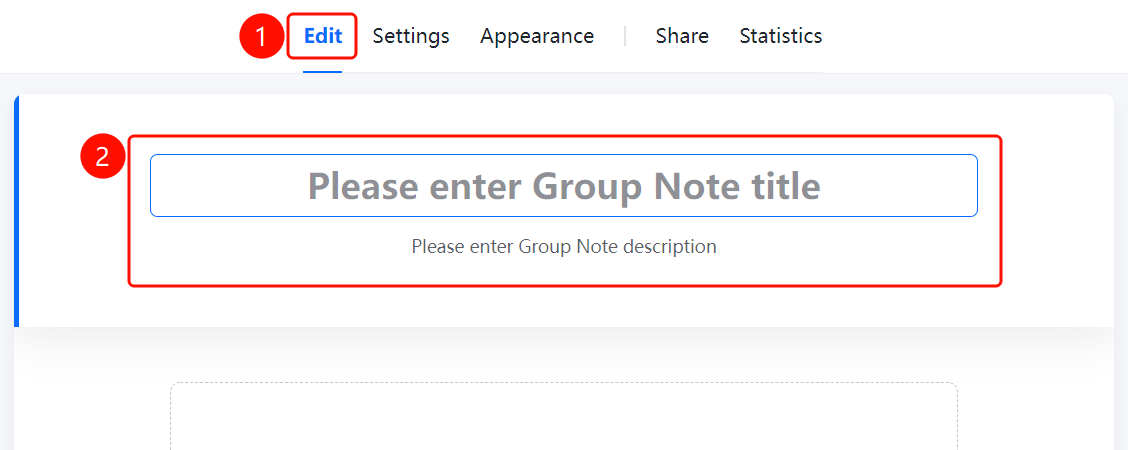
「Edit」 tab → Top title area
- Click the top 「Edit」 tab
- Enter the Group Form title in the 「Please enter Group Form title」 input box at the top of the page
- Enter the Group Form description in the 「Please enter Group Form description」 input box
- After the respondent opens the Group Form, they will see the title and description
FAQ
Q1: What is the difference between the title and the description?
- Solution: The title is the name of the Group Form, usually short; the description provides supplementary information such as the purpose of the chain and filling requirements, and can contain longer content.
Q2: Can the title and description be modified?
- Solution: Yes. Click the 「Edit」 tab and modify the title and description in the input boxes at the top.
Q3: Is there a character limit for the title?
- Solution: It is recommended to keep the title concise and clear. The description can be filled with more detailed content as needed.
Notes
- The title and description are the first impression for respondents, so it is recommended to clearly state the purpose of the Group Form
- The title and description can still be modified after publishing