Feature Summary
Matrix questions group several questions as sub-questions into one large question. The style is more elegant, and it is commonly used to package personal information, exam sections, and other scenarios to present multiple related questions together.
Feature Description
| Feature Dimension | Description |
|---|---|
| Member Restrictions | No member restrictions |
| Version Restrictions | No version restrictions |
Operation Steps
Add Matrix Questions
Feature Entry
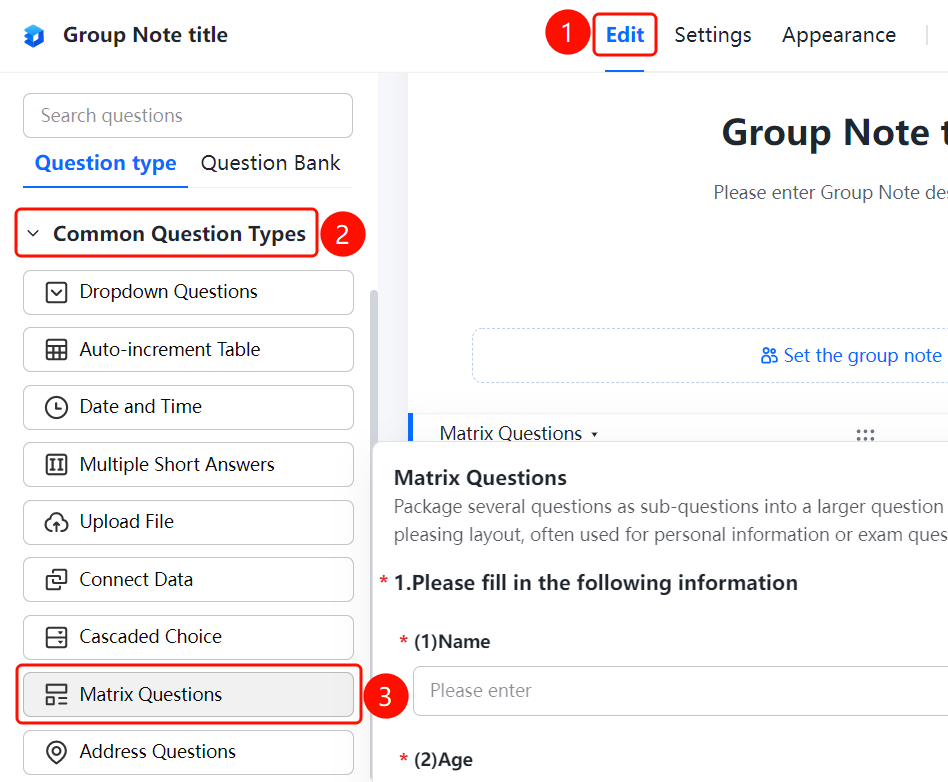
"Edit" tab -> "Common Question Types" -> "Matrix Question" button
- Click the "Edit" tab at the top.
- In the left panel, expand the "Common Question Types" area.
- Click the "Matrix Question" button to add matrix questions to the Group Form.
- Enter a main title in the question editing area, such as "Please fill in the following information".
- Add sub-questions, such as name, age, and gender. Each sub-question can be set with an independent question type.
FAQ
Question 1: What is the difference between matrix questions and regular questions?
- Solution: Matrix questions group several questions as sub-questions into one large question. The style is more elegant, and it is suitable for packaging personal information, exam sections, and other scenarios, making related questions visually more unified.
Question 2: Can different question types be set for sub-questions in a matrix question?
- Solution: Yes. Each sub-question in a matrix question can be set with an independent question type, such as fill-in-the-blank for name, numeric for age, and single-choice for gender.
Question 3: What scenarios are matrix questions suitable for?
- Solution: Matrix questions are commonly used in scenarios that require integrating multiple related questions, such as collecting personal information, exam questions, and evaluation forms.
Notes
- Matrix questions package and display related questions together, offering a more elegant style.
- Each sub-question supports independent settings for question types and required options.