Feature Summary
Industry questions are used to collect information about the respondent's industry. Preset industry options allow respondents to make quick selections, making it easy to analyze data by industry.
Feature Description
| Feature Dimension | Description |
|---|---|
| Premium Limit | No premium limit |
| Version Limit | No version limit |
Steps
Add an Industry Question
Feature Entry
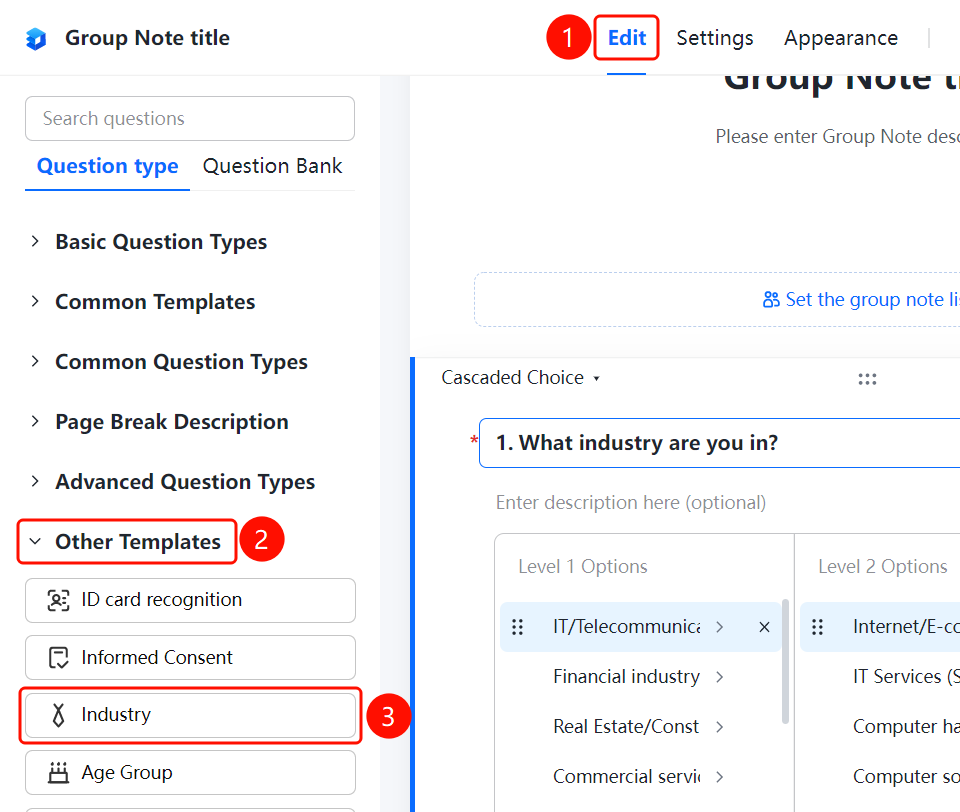
Edit tab > Advanced Questions > Other Templates > Industry button
- Click the Edit tab at the top.
- In the left panel, expand the Advanced Questions > Other Templates area.
- Click the Industry button to add the industry question to the Group Form.
- Enter the question content in the question editing area.
FAQ
Q1: What are the preset options for industry questions?
- Solution: Industry questions have preset common industry categories. Respondents can select them directly or customize them based on actual needs.
Q2: Can I customize the industry options?
- Solution: Yes. Click the industry question to edit or add options in the option editing area.
Q3: What scenarios are industry questions suitable for?
- Solution: Industry questions are suitable for scenarios such as surveys and user information collection where statistics need to be analyzed by industry.
Notes
- Industry questions are single-choice questions. Respondents can only select one industry.
- Preset options can be customized based on actual needs.