Feature Summary
Email questions are used to collect respondents' email addresses. Respondents enter their email addresses in the answer area, and the system automatically validates the email format to ensure that the collected email addresses are valid.
Feature Description
| Feature Dimension | Description |
|---|---|
| Premium Limit | No premium limit |
| Version Limit | No version limit |
Steps
Add an Email Question
Feature Entry
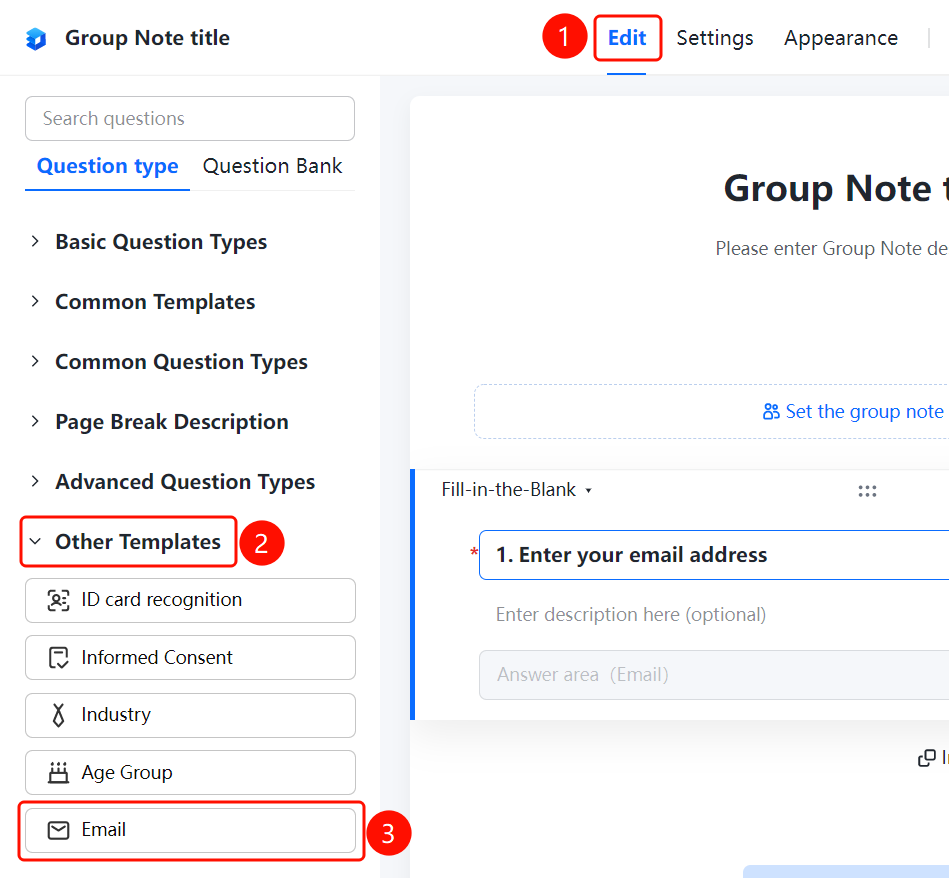
Edit tab > Advanced Question Types > Other Templates > Email button
- Click the Edit tab at the top.
- In the left panel, expand the Advanced Question Types > Other Templates area.
- Click the Email button to add the email question to the Group Form.
- Enter the question content in the question editing area, such as "Enter your email address".
FAQ
Question 1: Will the email question automatically validate the format?
- Solution: Yes. After respondents enter their email addresses in the answer area, the system will automatically validate the email format to ensure that the collected email addresses are valid.
Question 2: Can the email question be set as required?
- Solution: Yes. Click the email question, and enable "Required" in Basic Settings.
Question 3: What scenarios are email questions suitable for?
- Solution: Email questions are suitable for scenarios where you need to collect respondents' email addresses, such as event registration, information sign-up, and subscribing to notifications.
Notes
- The email question automatically validates the email format to ensure that the collected email addresses are valid.
- An email input box will be displayed in the respondent's answer area for easy entry.