Feature Summary
Cross-analysis is used to perform multi-dimensional cross-statistics on collected poll data. By defining row and column dimensions, it analyzes the relationships between different questions.
Feature Description
| Feature Dimension | Description |
|---|---|
| Membership Restriction | No membership restriction |
| Version Restriction | No version restriction |
Operation Steps
Using Cross-Analysis
Feature Entry
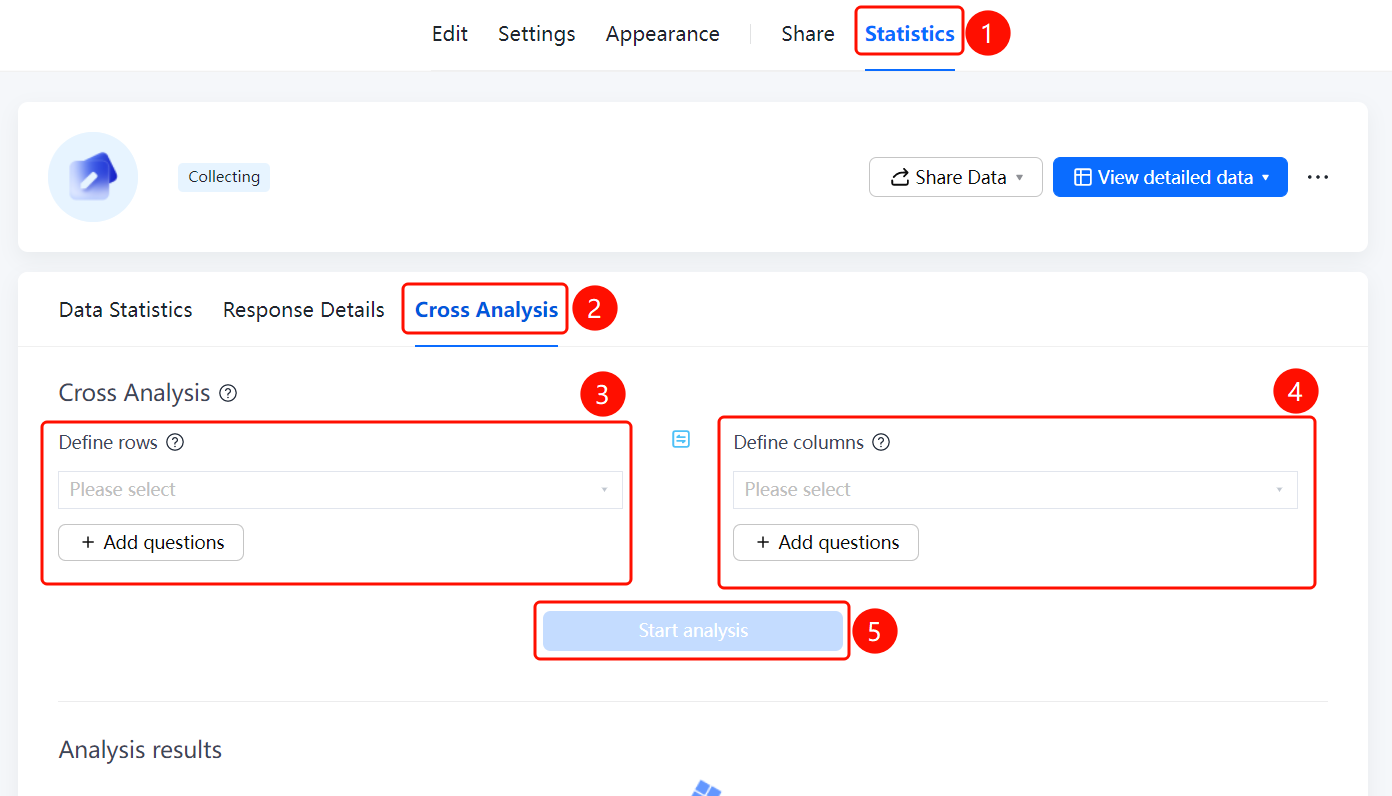
「Statistics」 tab → 「Cross-Analysis」 option
- Click the top 「Statistics」 tab
- Click the 「Cross-Analysis」 option in the left panel
- Click 「Define Row」 and 「Define Column」 to select the questions for cross-analysis
- Click 「Add Question」 to add more analysis dimensions
- Click the 「Start Analysis」 button to view the analysis results
FAQ
Q1: What is the use of cross-analysis?
- Solution: Cross-analysis can cross-tabulate data from two or more questions, helping to analyze the relationships between different questions.
Q2: How to select dimensions for cross-analysis?
- Solution: Click 「Define Row」 and 「Define Column」 to select the questions to be analyzed. You can also click 「Add Question」 to add more dimensions.
Q3: How to view the analysis results?
- Solution: After setting the row and column dimensions, click the 「Start Analysis」 button, and the analysis results will be displayed below.
Notes
- Cross-analysis is applicable to question types with options, such as multiple-choice questions and dropdown questions
- At least two dimensions, row and column, must be defined to perform the analysis