Feature Summary
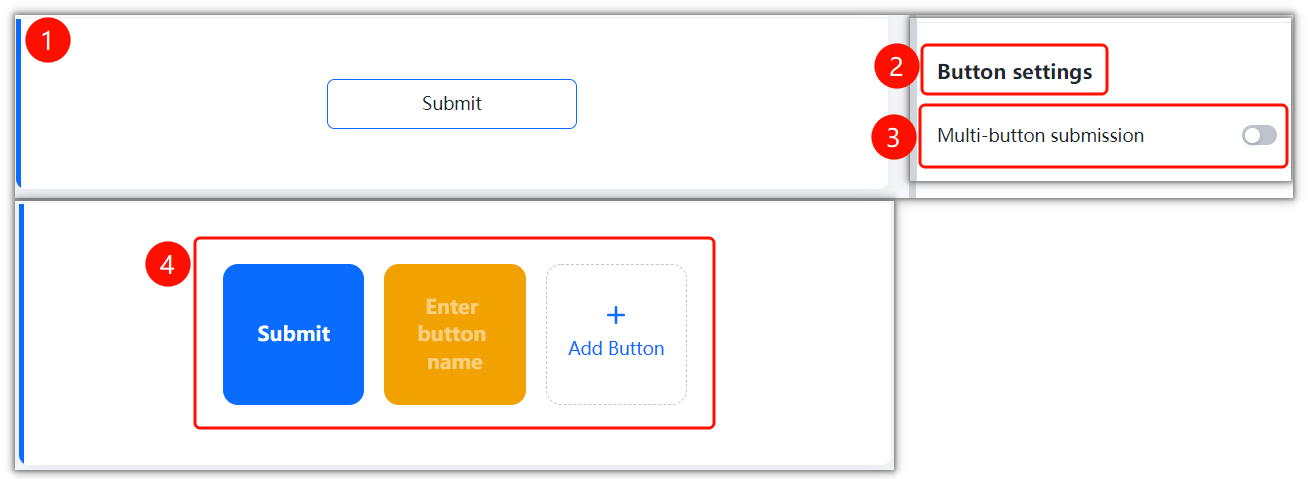
Submit button settings are used to customize the text and style of the Poll submit button, making the submit button better suited to the needs of polling scenarios.
Feature Description
| Feature Dimension | Description |
|---|---|
| Membership Restriction | No membership restriction |
| Version Restriction | No version restriction |
Operation Steps
Setting the Submit Button
Feature Entry
「Settings」 tab → 「Submit Button Settings」 option
- Click the top 「Settings」 tab
- Click the 「Submit Button Settings」 option
- Customize the text and style of the submit button
FAQ
Q1: How to customize the text of the submit button?
- Solution: Modify the text of the submit button in 「Settings」 → 「Submit Button Settings」.
Q2: Can the style of the submit button be set?
- Solution: Yes. You can customize the color and style of the button in the submit button settings.
Q3: When do the submit button settings take effect?
- Solution: They take effect immediately after being set. Voters will see the custom submit button when they open the Poll form.
Notes
- It is recommended that the submit button text be concise and clear, such as "Submit Vote", "Confirm Vote", etc.
- The submit button style can be kept consistent with the form's color scheme