Feature Summary
The rating question is commonly used in scoring scenarios. Voters can rate an evaluation object on a scale of 1 to 5 points, making it suitable for satisfaction surveys, service evaluations, and similar scenarios.
Feature Description
| Feature Dimension | Description |
|---|---|
| Membership Restriction | No membership restriction |
| Version Restriction | No version restriction |
Operation Steps
Adding a Rating Question
Feature Entry
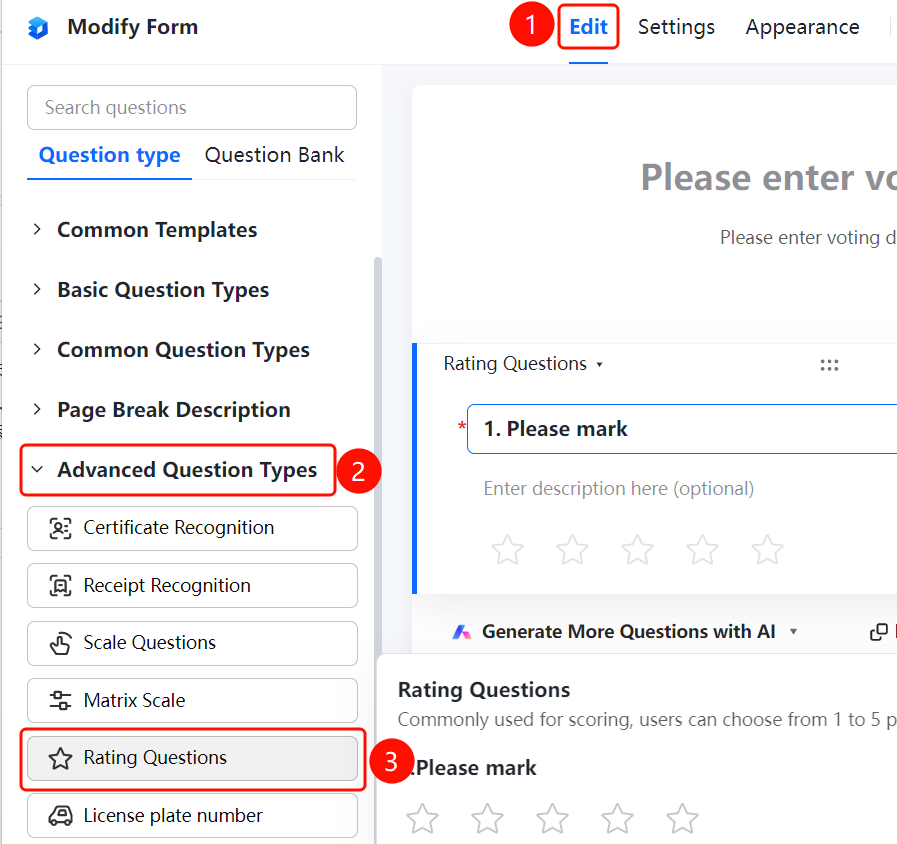
「Edit」 tab → 「Question Type」 → 「Rating Question」 button
- Click the 「Edit」 tab at the top
- Expand the 「Question Type」 area in the left panel
- Click the 「Rating Question」 button to add it to the form
FAQ
Q1: How many points does the rating question support?
- Solution: The rating question supports a scale of 1 to 5 points. Voters can select the corresponding score based on their evaluation.
Q2: What scenarios are rating questions suitable for?
- Solution: Rating questions are commonly used in scoring scenarios, such as satisfaction surveys, service evaluations, product ratings, etc.
Q3: Can the rating question be set as required?
- Solution: Yes. Click on the rating question, and enable 「This question is required」 in the 「Basic Settings」.
Notes
- Rating questions are displayed in a star format; voters can click to select a score
- Rating results can be viewed as a summary analysis on the data statistics page