Feature Summary
The voting title is used to set the name and description of the vote. When voters open the poll, they first see the title and description information. It supports "generate form based on title" to quickly create voting content.
Feature Description
| Feature Dimension | Description |
|---|---|
| Membership Restrictions | No membership restrictions |
| Version Restrictions | No version restrictions |
Operating Steps
Set the Poll Title
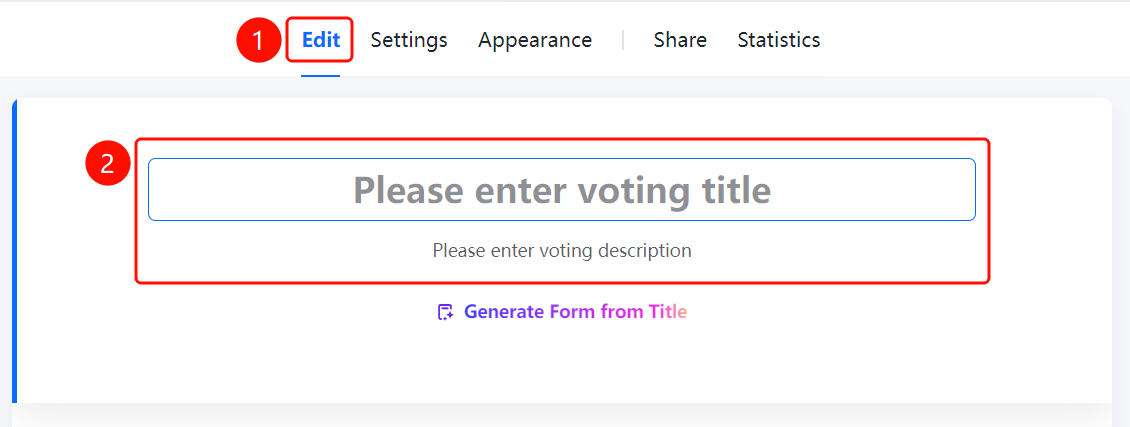
Access Point"Edit" tab → Top title area
- Click the "Edit" tab at the top
- Enter the poll title in the "Enter poll title" input field
- Enter the poll description in the "Enter poll description" input field
- Click "Generate form based on title" to quickly generate form content
Frequently Asked Questions
Q1: What is the difference between a title and a description?
- Solution: The title is the name of the poll, usually short; the description provides additional information about the purpose, rules, etc.
Q2: How can I quickly generate a form based on the title?
- Solution: After entering the title, click "Generate Form from Title," and the system will automatically create voting options.
Q3: Can the title and description be edited?
- Solution: Yes. Click the "Edit" tab and modify them directly in the input box at the top.
Notes
- The title and description are the first impressions voters see; clearly stating the purpose of the poll is recommended.
- "Generate Form from Title" allows you to quickly create poll content.