Feature Overview
Matrix questions group multiple sub-questions into a single, larger question, offering a more visually appealing layout. They are commonly used for collecting personal information or structuring complex exam questions. Each sub-question can be independently configured with different question types.
Feature Description
| Functional Dimension | Description |
|---|---|
| Membership Restrictions | No membership restrictions |
| Version Restrictions | No version restrictions |
Operating Steps
Adding a Matrix Question
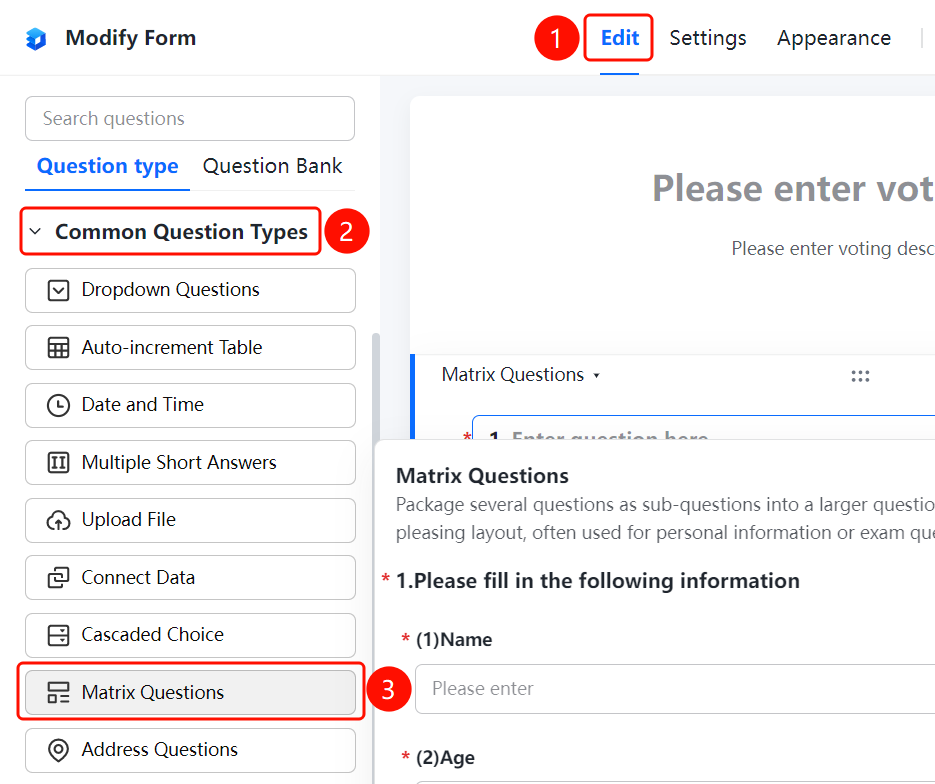
Access Path"Edit" tab → "Common Question Types" → "Matrix Question" button
- Click the "Edit" tab at the top
- Expand the "Common Question Types" section in the left panel
- Click the "Matrix Question" button to add a matrix question to the poll
- Enter a main title in the question editing area, such as "Please fill in the following information"
- Add sub-questions (e.g., name, age, gender), each of which can be independently configured with different question types
Frequently Asked Questions
Question 1: What is the difference between a matrix question and a regular question?
- Solution: A matrix question groups multiple questions into a single, larger question by bundling them as sub-questions. This design offers a more visually appealing layout and is ideal for organizing personal information, exam sections, or other scenarios where related questions need to appear as a unified unit.
Question 2: Can different question types be used for sub-questions within a matrix?
- Solution: Yes. Each sub-question in a matrix can independently use different question types—for example, using a fill-in-the-blank for name, a numeric input for age, and a single-choice for gender.
Question 3: In what scenarios are matrix questions suitable?
- Solution: Matrix questions are commonly used in situations requiring grouped data collection, such as gathering personal information, designing exams, or creating evaluation forms—any context where multiple related questions should be presented together cohesively.
Notes
- Matrix questions bundle related items for a cleaner, more organized display.
- Each sub-question supports independent configuration of question type and required field settings.