Feature Summary
File Management is used to open the forms file directory in WPS Cloud Document, making it easy for users to view and manage all forms files, and supports operations such as creating and importing files.
Feature Description
| Feature Dimension | Description |
|---|---|
| Membership Restriction | No membership restriction |
| Version Restriction | No version restriction |
Steps
Open File Management
Feature Entry
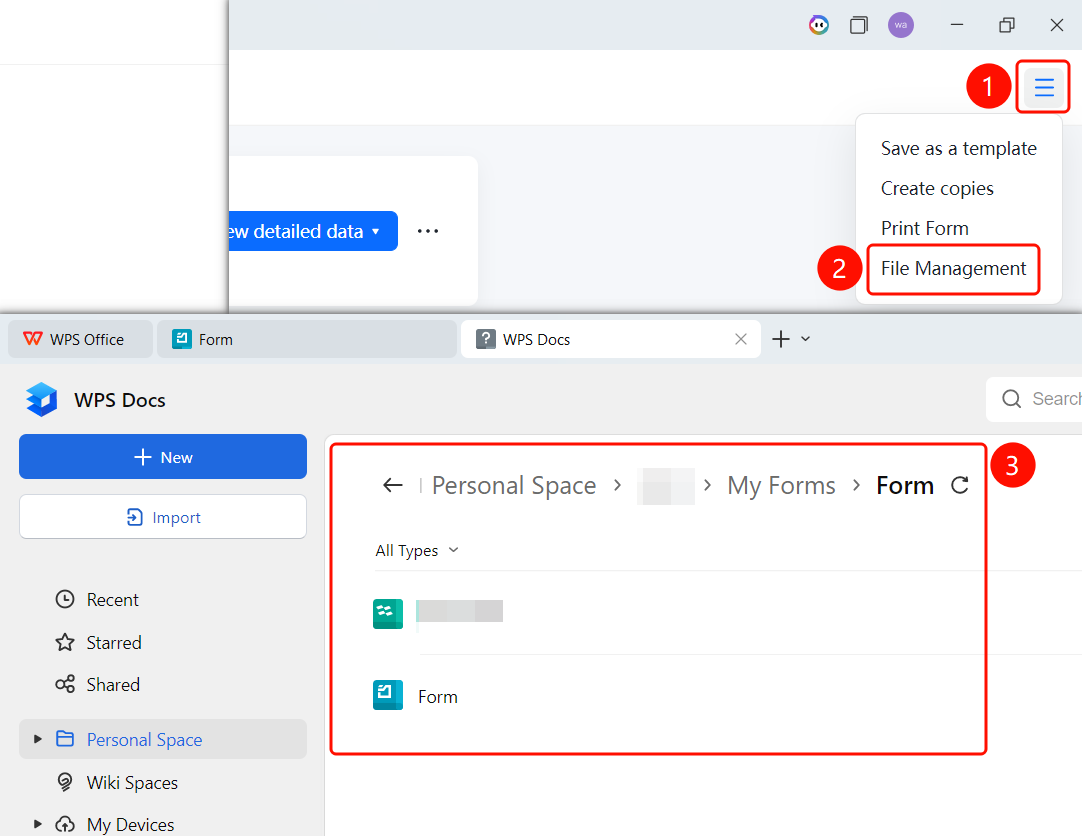
Top toolbar → "File Management" button
- On the editing page, click the "File Management" button in the top toolbar
- The system navigates to the "Personal Space" → "Applications" → "MyForms" directory
- On the File Management page, you can view all forms files
- Click "New" to create a new file, or click "Import" to import a file
FAQ
Q1: Where are the forms in File Management stored?
- Solution: Forms files are stored in the "Personal Space" → "Applications" → "MyForms" directory and can be accessed directly through File Management.
Q2: How do I create a new file in File Management?
- Solution: Click the "New" button on the File Management page to create a new forms file.
Q3: How do I import an existing forms file?
- Solution: Click the "Import" button on the File Management page and select the forms file you want to import.
Notes
- File Management provides direct access to forms files in WPS Cloud Document
- Supports viewing files by categories such as Recent, Starred, and Shared