Feature Summary
Clear Response Data is used to clear all response data collected by the form. Once cleared, the data cannot be recovered. It is suitable for scenarios such as restarting data collection or cleaning up test data.
Feature Description
| Feature Dimension | Description |
|---|---|
| Membership Restriction | No membership restriction |
| Version Restriction | No version restriction |
Operation Steps
Clear Response Data
Feature Entry
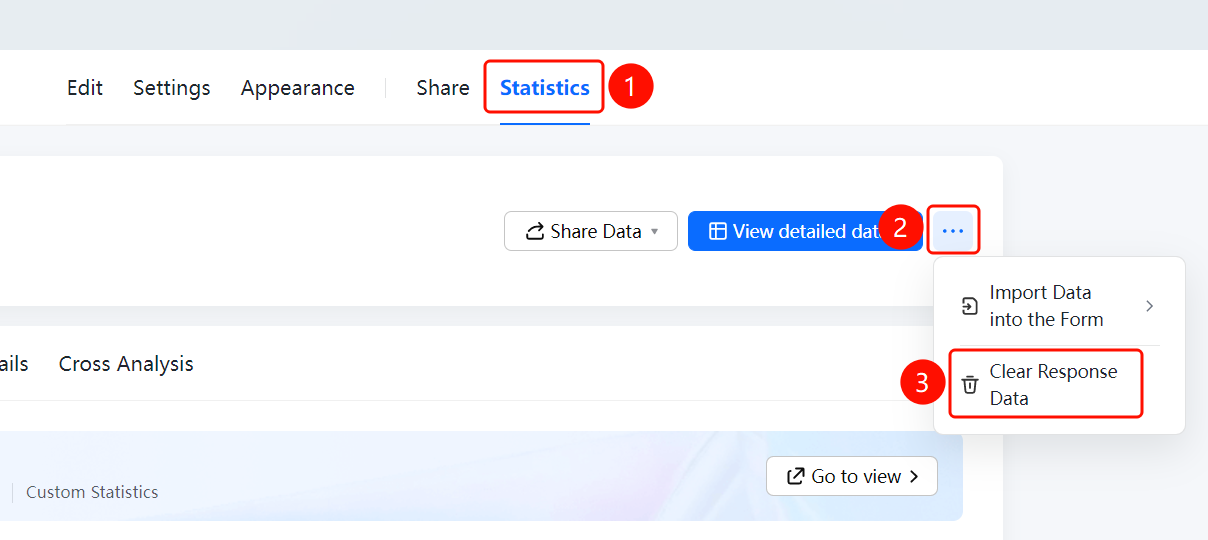
「Statistics」 tab → 「Clear Response Data」 option
- Click the 「Statistics」 tab at the top
- Click the 「Clear Response Data」 option in the left panel
- A confirmation prompt will pop up. After confirming, all response data will be cleared.
- After clearing, the data on the statistics page will be reset to zero.
FAQ
Q1: Can the response data be recovered after clearing?
- Solution: Response data cannot be recovered after clearing. Please proceed with caution. It is recommended to export a data backup before clearing.
Q2: In what situations should I clear response data?
- Solution: It is suitable for scenarios such as restarting data collection, cleaning up test data, or clearing old data before reusing a form.
Q3: Will clearing response data affect the form structure?
- Solution: No. Clearing response data only removes the collected data. The form questions and settings remain unchanged.
Notes
- The clear response data operation is irreversible. It is recommended to export a data backup first.
- After clearing, the form structure and settings remain unchanged and can continue to be used.