Feature Summary
The email template is used to quickly add email input questions. The respondent answer area is preset to the email format, making it convenient to collect email information.
Feature Description
| Feature Dimension | Description |
|---|---|
| Premium Limitation | No premium limitation |
| Version Limitation | No premium limitation |
Steps
Add an Email Question
Feature Entry
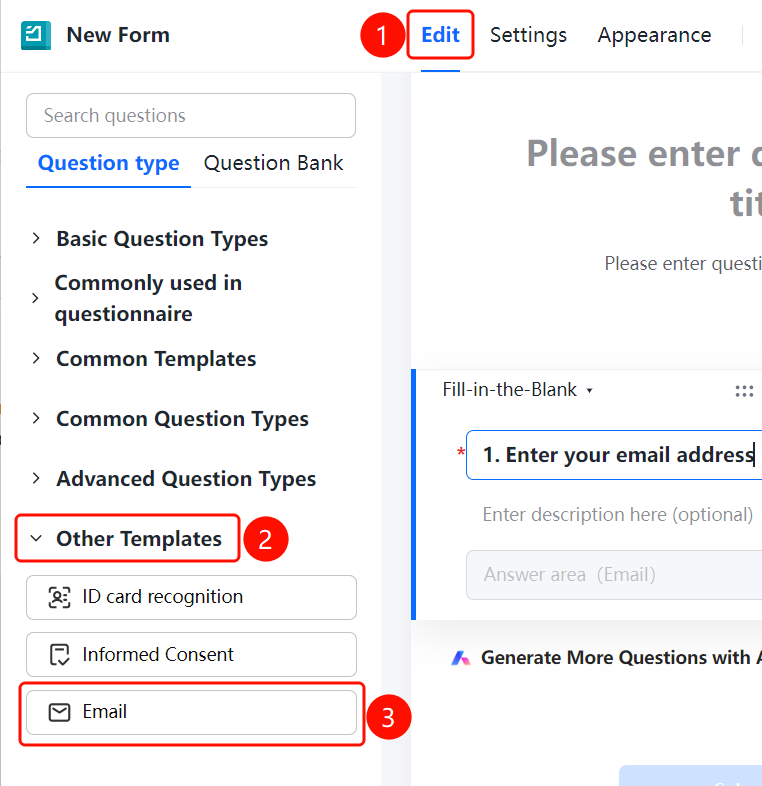
"Edit" tab → "Other Templates" → "Email" option
- Click the "Edit" tab at the top.
- Expand the "Other Templates" area in the left panel.
- Click the "Email" option to add the email question to the questionnaire.
- The default question title is "Enter your email".
- The respondent answer area is preset to the email format, allowing respondents to enter their email addresses.
FAQ
Question 1: What are the requirements for the email format?
- Solution: The email format is typically xxx@xxx.xxx. The system will automatically verify whether the entered format is correct.
Question 2: What is the difference between the email template and a fill-in-the-blank question?
- Solution: The email template has a preset email format restriction, allowing respondents to only enter content that matches the email format. Fill-in-the-blank questions do not restrict the format by default.
Notes
- Email belongs to other templates and is located in the "Other Templates" area of the editing panel.
- It is suitable for collecting user contact emails.