Feature Summary
The submit button settings are used to configure the style and behavior of the submit button at the bottom of the questionnaire, supporting multi-button submission.
Feature Description
| Feature Dimension | Description |
|---|---|
| Member Limit | No member limit |
| Version Limit | No version limit |
Steps
Enable Multi-Button Submission
Feature Entry
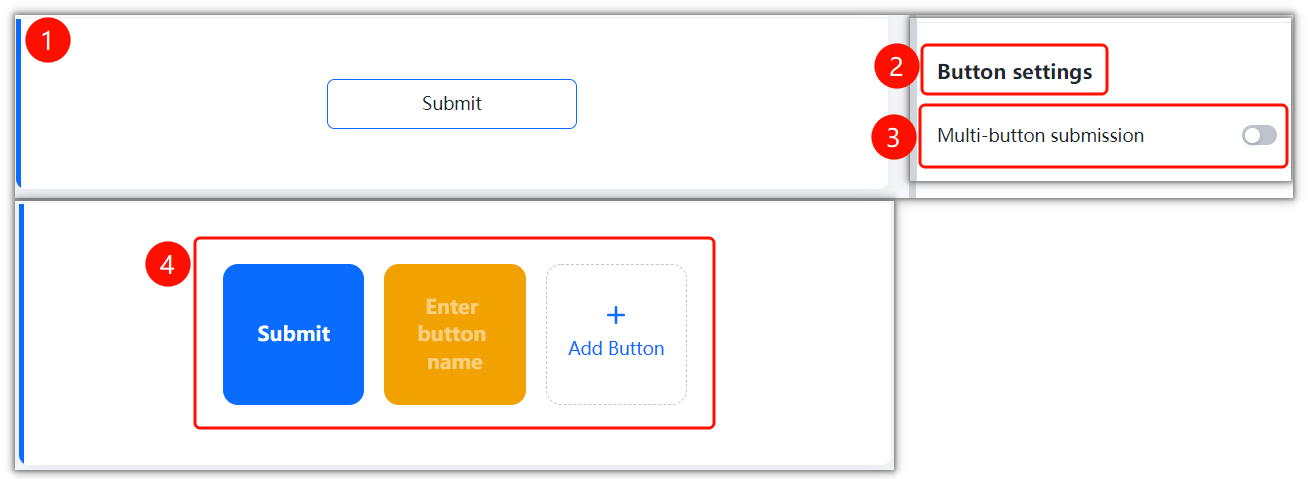
Edit tab > Submit Button Settings area > Multi-Button Submission switch
- Find the Submit button at the bottom of the edit page.
- Click Button Settings in the left settings panel.
- Turn on the Multi-Button Submission switch.
- Once enabled, you can add multiple buttons, and each button can have a custom name and color.
FAQ
Question 1: What is the purpose of multi-button submission?
- Solution: Multi-button submission allows you to set multiple submission options. It is suitable for questionnaires that need to distinguish between different submission scenarios, such as "Agree", "Disagree", and "Abstain".
Notes
- By default, there is only a single "Submit" button. You must manually enable the multi-button submission feature.
- Multi-button submission is suitable for scenarios where respondents need to make selective submissions.