Feature Summary
Matrix questions group several sub-questions into one large question, offering a more appealing style. This is commonly used for personal information, exam sections, and more. Each sub-question can have its question type configured independently.
Feature Description
| Feature Dimension | Description |
|---|---|
| Premium limitations | No premium limitations |
| Version limitations | No version limitations |
| Platform limitations | Desktop only |
Steps
Add a Matrix Question
Feature Entry
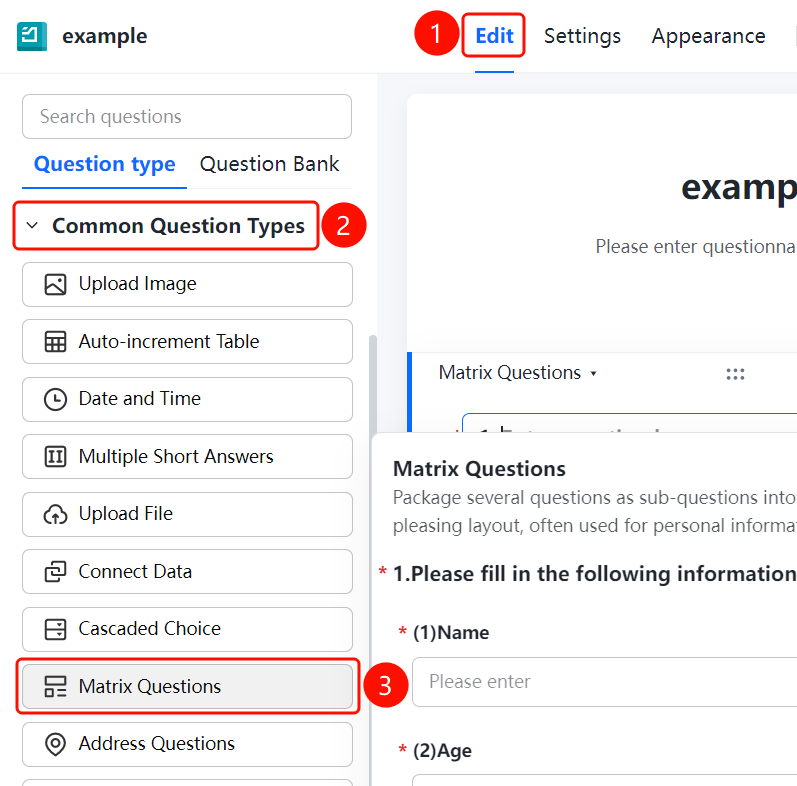
Edit tab > Common Question Types > Matrix Question button
- Click the Edit tab at the top.
- Expand the Common Question Types area in the left panel.
- Click the Matrix Question button to add a matrix question to the questionnaire.
- Enter a main title in the question editing area, such as "Enter the following information".
- Add sub-questions, such as name, age, and gender. Each sub-question can have its question type configured independently.
FAQ
Question 1: What is the difference between a matrix question and a regular question?
- Solution: Matrix questions group several sub-questions into one large question, offering a more appealing style. This is suitable for personal information, exam sections, and other scenarios, making related questions visually more unified.
Question 2: Can different question types be set for sub-questions in a matrix question?
- Solution: Yes. Each sub-question in a matrix question can have its question type configured independently. For example, you can use fill-in-the-blank for name, numeric for age, and single-choice for gender.
Question 3: What scenarios are matrix questions suitable for?
- Solution: Matrix questions are commonly used to collect personal information, exam questions, evaluation forms, and other scenarios where multiple related questions need to be integrated.
Notes
- Matrix questions group related questions together, offering a more appealing style.
- Each sub-question supports independent configuration of question types and required options.