Feature Summary
The ID numbers template is used to quickly add ID number input questions. Respondents can enter their ID numbers manually or automatically fill them in by scanning an ID card photo, making it easy to collect identity information.
Feature Description
| Feature Dimension | Description |
|---|---|
| Premium Limit | No premium limit |
| Version Limit | No version limit |
Steps
Add an ID Number Question
Feature Entry
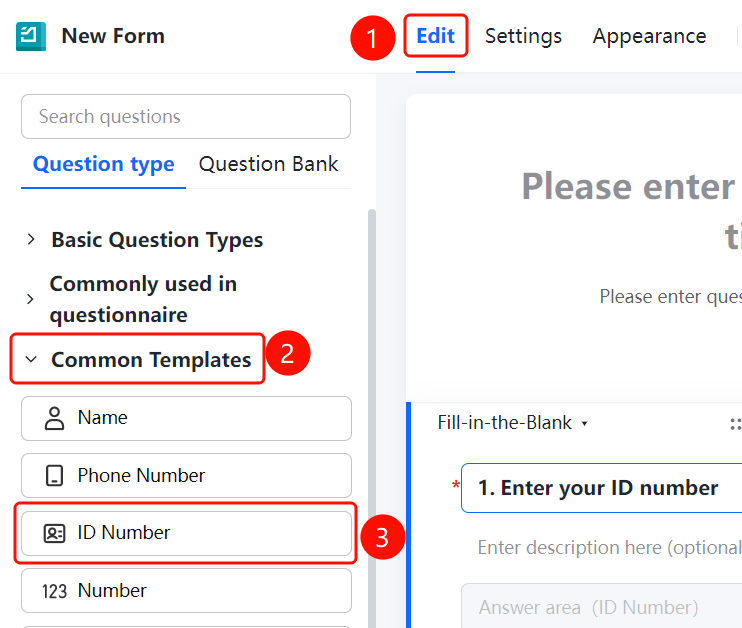
Edit tab > Common Templates > ID Numbers option
- Click the Edit tab at the top.
- Expand the Common Templates area in the left panel.
- Click the ID Numbers option to add the ID number question to the questionnaire.
- The default question title is Please enter your ID number.
- Respondents can automatically fill in the information using the Scan ID Card Photo feature.
FAQ
Question 1: What are the format requirements for ID numbers?
- Solution: The ID number must be 18 digits (or 15 digits). The system will automatically verify whether the input format is correct.
Question 2: Is the ID card photo scanning accurate?
- Solution: The system recognizes ID card photos using OCR technology, which is generally accurate. We recommend that respondents verify the information before submitting.
Notes
- ID numbers are sensitive information. We recommend that you properly secure the collected data.
- The Scan ID Card Photo feature must be used on a device with a camera.