Feature Summary
The form title is the identifying information of the questionnaire. After setting the title and description, respondents will see this content first when they open the questionnaire.
Feature Description
| Feature Dimension | Description |
|---|---|
| Member Limit | No member limit |
| Version Limit | No version limit |
| Platform | Desktop |
Steps
Set Up Form Title
Feature Entry
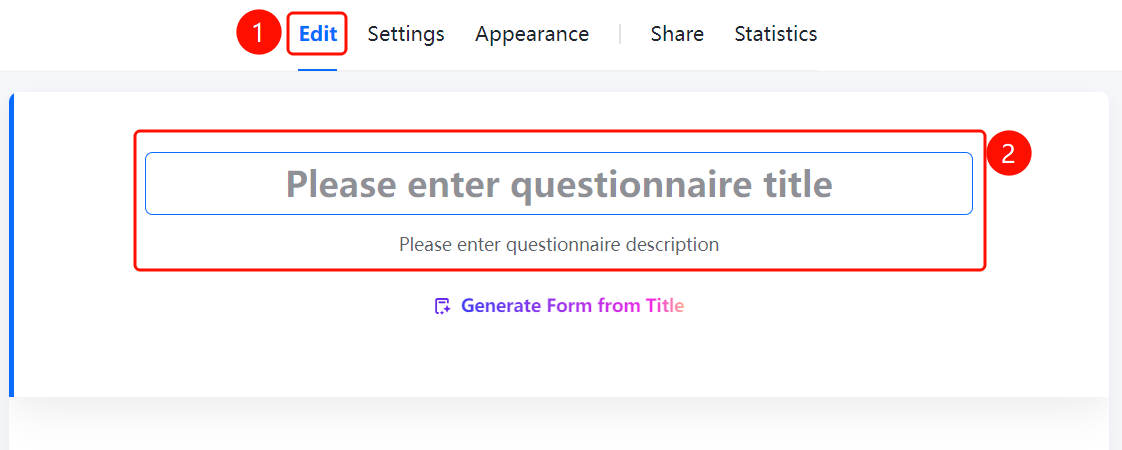
"Edit" tab → Top title area
- Click the "Edit" tab at the top.
- Enter the form title in the "Enter form title" input box.
- Enter the description in the "Enter form description" input box.
- Respondents will see the title and description after opening the questionnaire.
FAQ
Question 1: What is the difference between the title and description?
- Solution: The title is the name of the questionnaire and is usually short. The description is supplementary information about the purpose and requirements of the questionnaire.
Question 3: Can the title be modified?
- Solution: Yes. Click the "Edit" tab and modify it in the top input box.
Notes
- The title is the first impression seen by respondents. We recommend keeping it concise and clear.