Feature Summary
When you need to convert large blocks of text descriptions or lists into structured tables, AI Text to Table can intelligently recognize the table logic in the text and automatically generate tables. This helps you quickly structure information and say goodbye to manual table creation.
Feature Description
| Feature Dimension | Description |
|---|---|
| Membership Limits | Available for both WPS Pro+ and WPS Premium |
| Version Limits | Applicable to the latest version on the WPS official website |
Operating Steps
AI Text to Table
Feature Entry
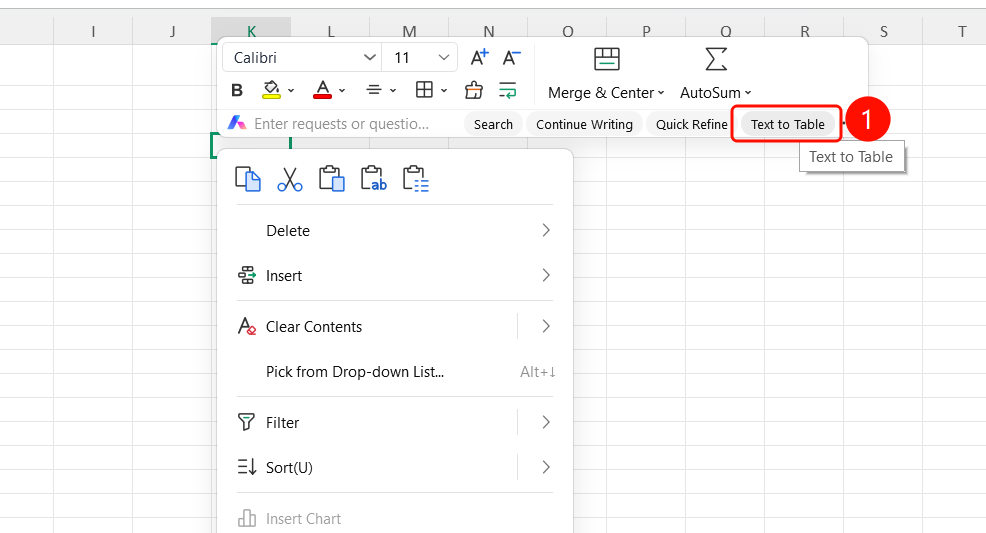
Select cell → Right-click menu → "Text to Table"
- Select the cell containing text content.
- Right-click the cell.
- Select "Text to Table" from the right-click menu.
- AI automatically recognizes the text structure and generates a table.
View Table Conversion Results
Feature Entry
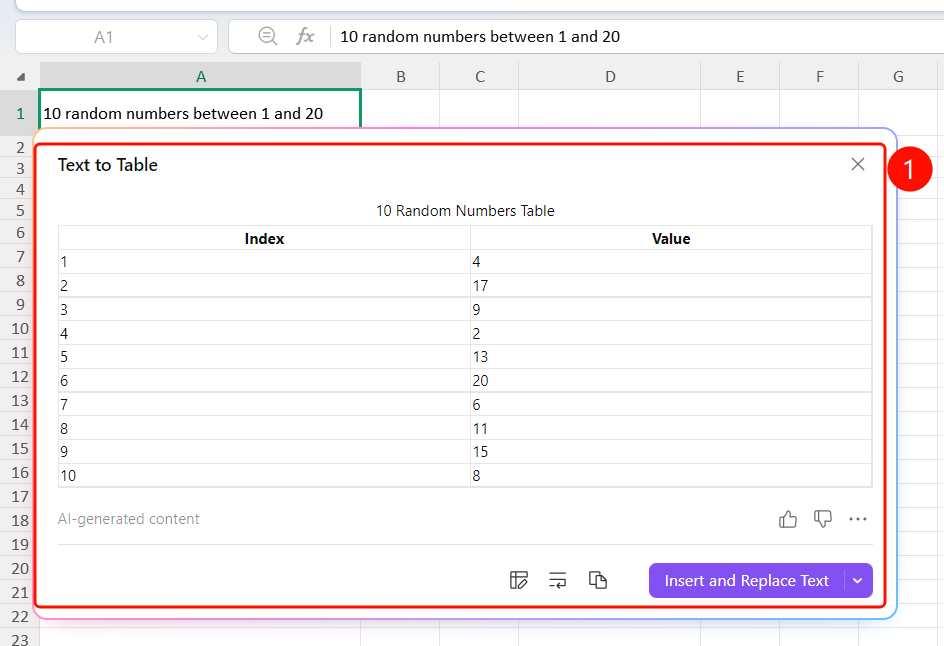
"Text to Table" floating window
The "Text to Table" floating window pops up after AI generation is complete.
The floating window displays a preview of the automatically generated table (including headers and table content).
Operation options are provided at the bottom:
- "Adjust Headers & Retry": Modify headers and regenerate
- "Split Columns Only": Only perform column splitting
- "Copy": Copy the table to the clipboard
- "Insert and Replace/keep Text": Insert the table into the document and replace/ the original text
FAQs
Question 1: What text formats are supported by Text to Table?
- Solution: It supports lists described in natural language, numbered content, structured text, etc. AI will intelligently recognize the table logic within them.
Question 2: Can I adjust the number of columns after converting to a table?
- Solution: Yes. Click the "Adjust Headers & Retry" button to modify the number of header columns and regenerate the table.
Question 3: How do I insert the table into the document?
- Solution: Click the "Insert & Replace Text" button, and the generated table will be inserted into the document, replacing the original text content.
Notes
- The more structured the text content is (such as lists and numbering), the better the table conversion result will be.