Feature Summary
When you need to quickly understand the content of a long document or extract key information, Chat Doc can answer your specific questions based on the document content, helping you precisely locate the information you need without reading the entire document.
Feature Description
| Feature Dimension | Description |
|---|---|
| Membership Limits | Available for both WPS Pro+ and WPS Premium |
| Version Limits | Applicable to the latest version on the WPS official website |
Steps
Chat PDF
Feature Entry
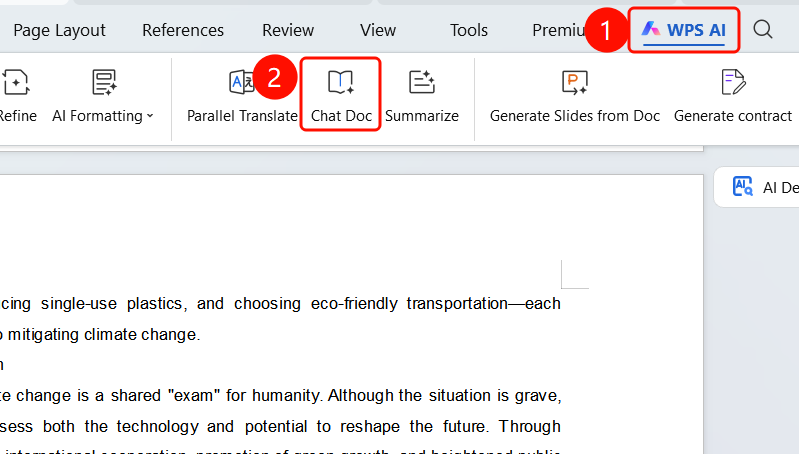
"WPS AI" tab → "Chat Doc"
- Open the document you want to ask questions about.
- Click the "WPS AI" tab on the top menu bar.
- Find and click the "Chat Doc" button.
- The WPS Copilot sidebar will pop up on the right.
Start a Q&A
Feature Entry
WPS Copilot sidebar → Input box
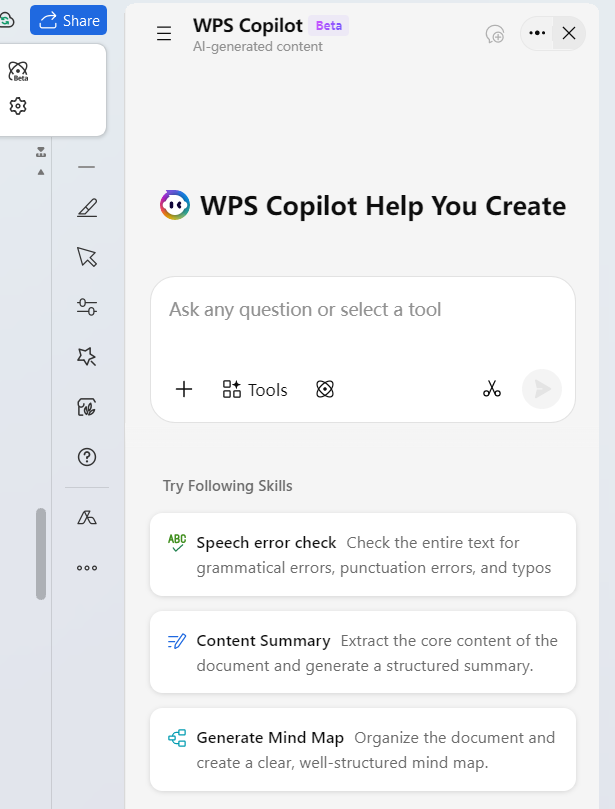
The sidebar title is "WPS Copilot Helps You Create".
Enter the question you want to ask in the input box (e.g., "Summarize the core points of this document").
Click the send button, and the AI will generate an answer based on the document content.
Feature recommendations are provided at the bottom of the sidebar:
- Agent Mode (Experimental): Standardize formatting, layout, and edit documents.
- Proofread: Check the entire document for grammatical errors, punctuation mistakes, and typos.
- Summarize: Extract the core content of the document and generate a structured summary.
- Generate MindMap: Organize the document structure and generate a clear, logical mind map.
FAQ
Q1: What is the difference between Chat Doc and Summarize?
- Solution: Chat Doc answers specific questions and is suitable for quickly locating specific information. Summarize provides a structured summary of the entire document and is suitable for a general understanding of the document content.
Q2: What are the feature recommendations in the sidebar?
- Solution: Quick features such as Agent Mode (standardize formatting, layout, and edit documents), Proofread, Summarize, and Generate MindMap are provided at the bottom of the sidebar, which you can click to use directly.
Q3: Can I ask questions continuously?
- Solution: Yes. You can ask follow-up questions continuously during the conversation, and the AI will answer subsequent questions based on the context of the previous conversation.
Notes
- There is no limit on the number of times WPS Plus and Premium members can use Chat Doc.
- The AI answers based on the document content. Ensure that the document is fully loaded.
- The sidebar provides various quick features such as Proofread, Summarize, and MindMap.