Feature Summary
The local shortcut generation feature allows you to add shortcuts for collaborative documents to a local path, facilitating quick access and management of frequently used files without moving the original document location.
Feature Description
| Feature Dimension | Description |
|---|---|
| Membership Restriction | No membership restriction |
| Version Restriction | No version restriction |
Operation Steps
Method 1: Generate Local Shortcut
Feature Entry
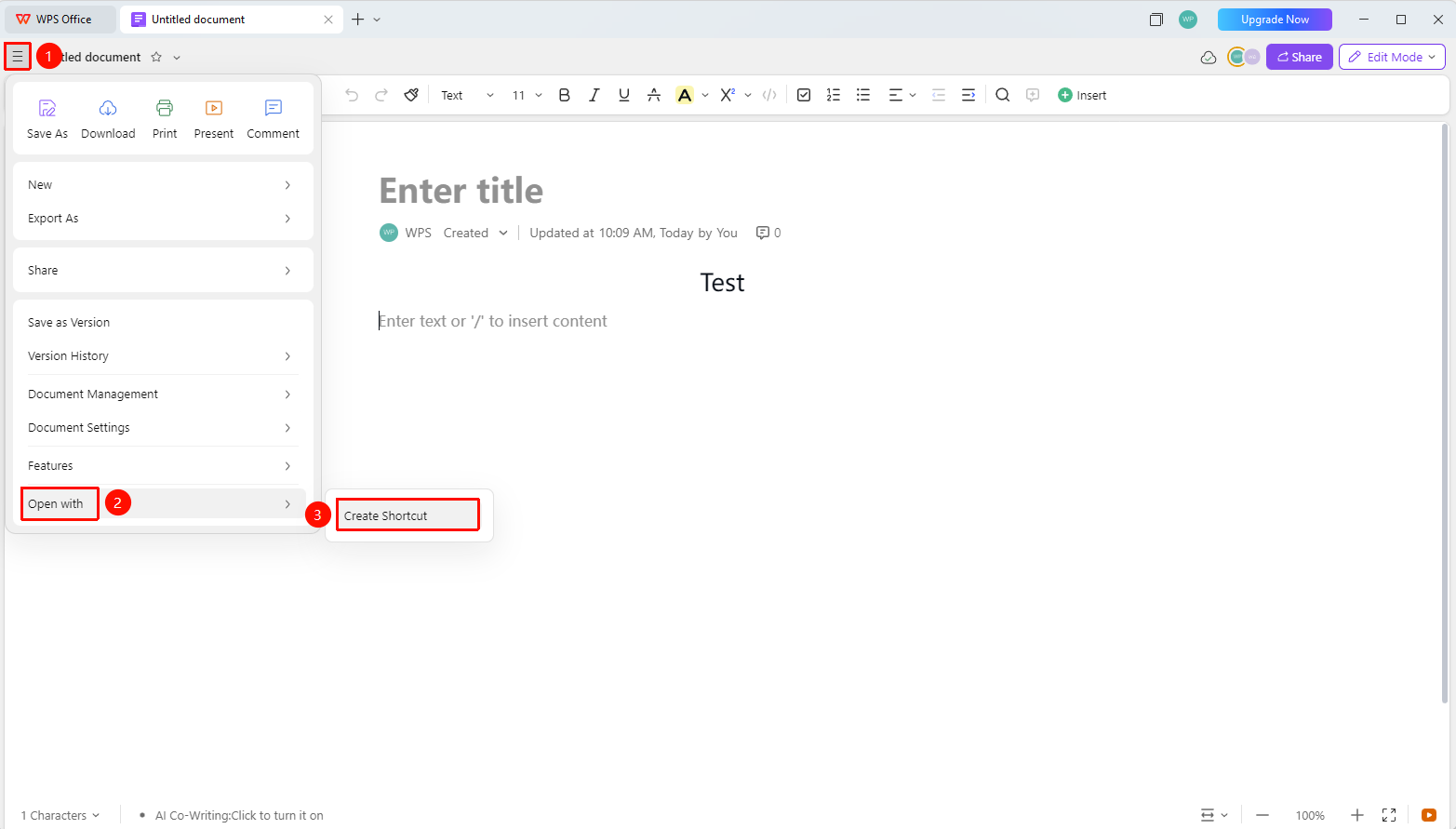
「File Operation Button」→「Open in Other Ways」→「Generate Local Shortcut」
- Open the target collaborative document
- Click the File Operation button (☰ icon) in the upper left corner
- Select 「Open in Other Ways」 from the drop-down menu
- Click 「Generate Local Shortcut」
- The system will automatically download the shortcut to the local download path
- You can subsequently move/copy the shortcut to other local paths
FAQ
Q1: Will adding a shortcut copy the original document?
- Solution: No. Adding a shortcut only generates a shortcut link pointing to the original document, does not occupy additional storage space, and the original document remains in its original location.
Q2: What is the difference between a shortcut and the original document?
- Solution: A shortcut is a link pointing to the original document; double-clicking it opens the content of the original document. Deleting the shortcut will not affect the original document, but the shortcut will become invalid after the original document is deleted.
Q3: How to manage shortcuts?
- Solution: Delete the shortcut that has been downloaded to the local device, or delete the shortcut in the 「Generate Local Shortcut」 interface.
Notes
- Adding a shortcut will not move or copy the original file; it only generates a link pointing to that file
- Deleting a shortcut will not affect the original document
- If the original document is deleted or moved, the shortcut will not open properly
- To create a cloud folder desktop shortcut, right-click the desired folder on the WPS homepage → 「Create Desktop Shortcut」