Feature Summary
WPS Docs supports the Options for Duplex Printing feature, allowing you to set the print order of odd and even pages during manual duplex printing.
Feature Description
| Feature Dimension | Description |
|---|---|
| Premium Restrictions | None |
| Version Restrictions | None |
Steps
Open Options for Duplex Printing via the File Menu
Feature Entry
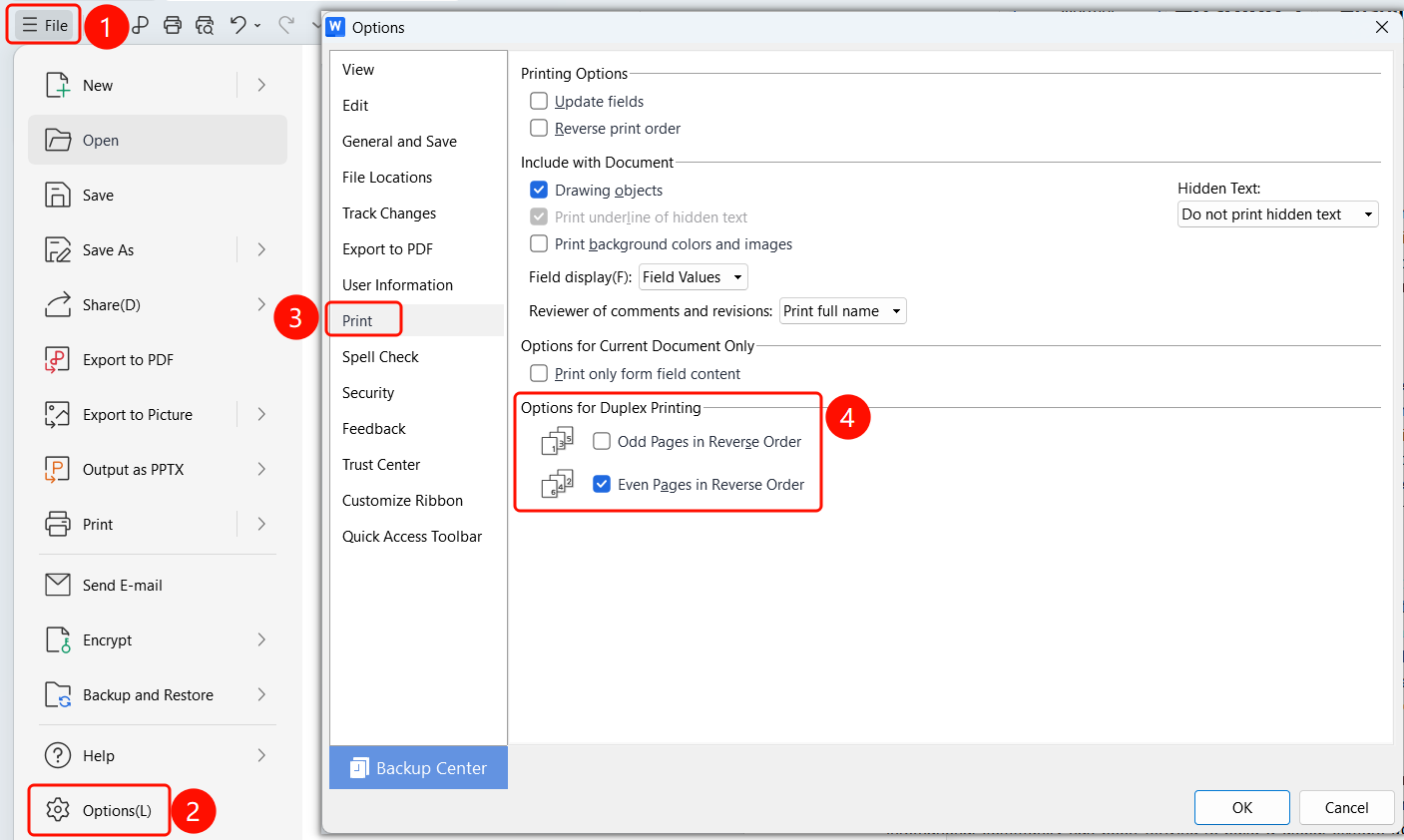
Top menu bar > File > Options > Print > Options for Duplex Printing
Click the File button in the top menu bar.
Click the Options button in the menu.
Select the Print tab in the Options dialog box.
Set the options in the Options for Duplex Printing area:
- Odd pages in descending order: Select to print odd pages first, in descending order of page numbers.
- Even pages in descending order: Select to print even pages first, in descending order of page numbers.
Click OK to save the settings.
FAQ
Question 1: What do "Odd pages in descending order" and "Even pages in descending order" do?
- Solution: Printing in descending order is suitable for the output order of certain printers, ensuring that the page order is correct after flipping the paper.
Question 2: Should odd or even pages be printed first during manual duplex printing?
- Solution: Generally, print odd pages first, then flip the paper to print even pages.
Question 3: Do these options affect automatic duplex printing?
- Solution: No, these options only apply to manual duplex printing.