Feature Summary
WPS Docs supports the "Options for current document only" feature, allowing you to configure print options, such as printing only form field content, that apply only to the current document.
Feature Details
| Dimension | Description |
|---|---|
| Premium requirements | None |
| Version requirements | None |
Steps
Open Options for Current Document Only via the File Menu
Feature Entry
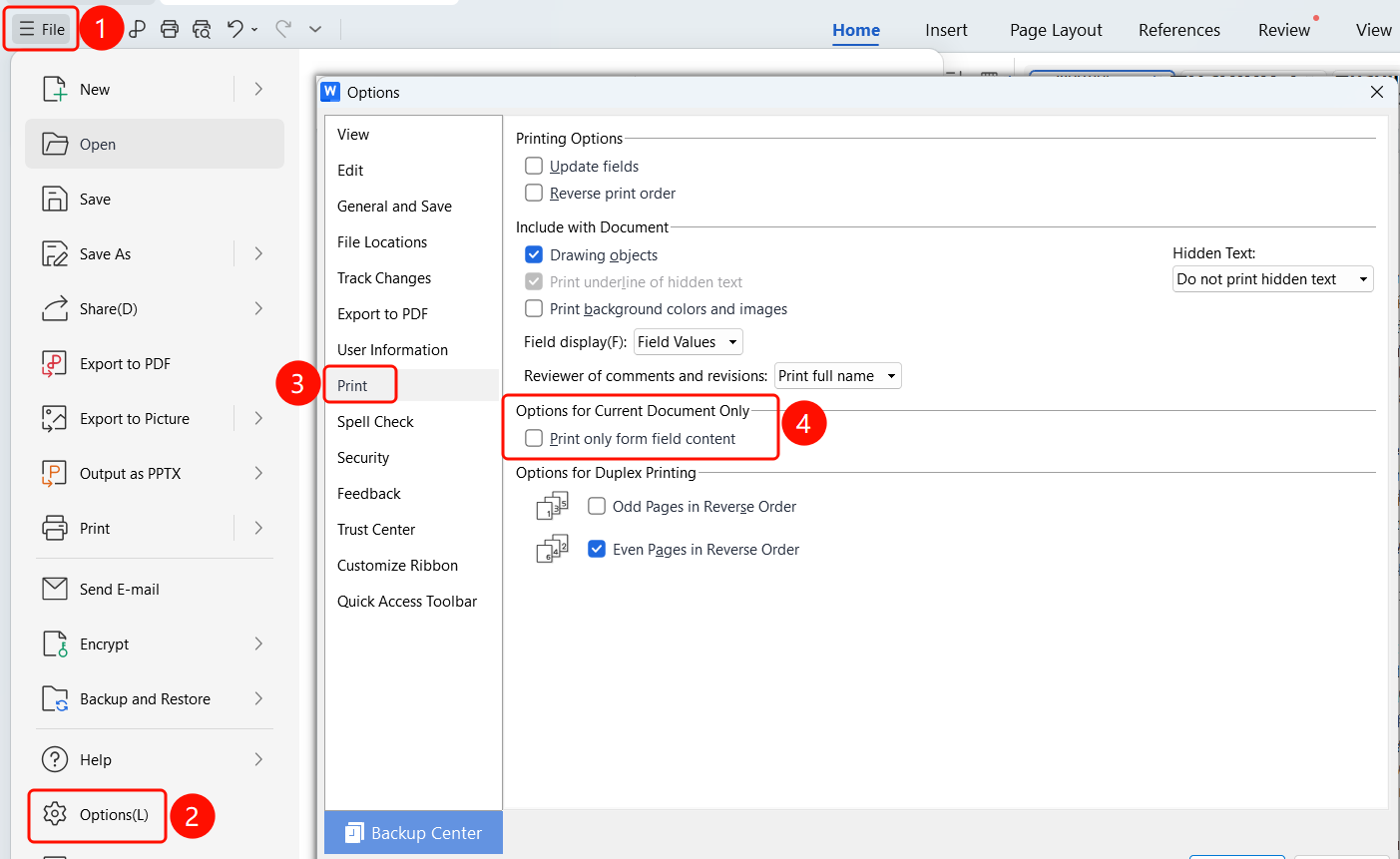
Top menu bar > File > Options > Print
- Click File on the top menu bar.
- Click Options in the menu.
- Select the Print tab in the Options dialog box.
- Configure settings in the Options for current document only area.
FAQ
Q1: What does "Print only form field content" do?
- Solution: When selected, only the content entered in the form is printed. The form template and other text are not printed.
Q2: Does this option affect other documents?
- Solution: No. "Options for current document only" applies only to the current document.
Q3: What is a form field?
- Solution: Form fields are editable fields in a document used for entering information.