Feature Summary
WPS Docs supports the printer feature, allowing you to select and configure printer devices to print documents.
Feature Details
| Feature Dimension | Description |
|---|---|
| Premium Restrictions | None |
| Version Restrictions | None |
Steps
Selecting a Printer via Print Settings
Entry
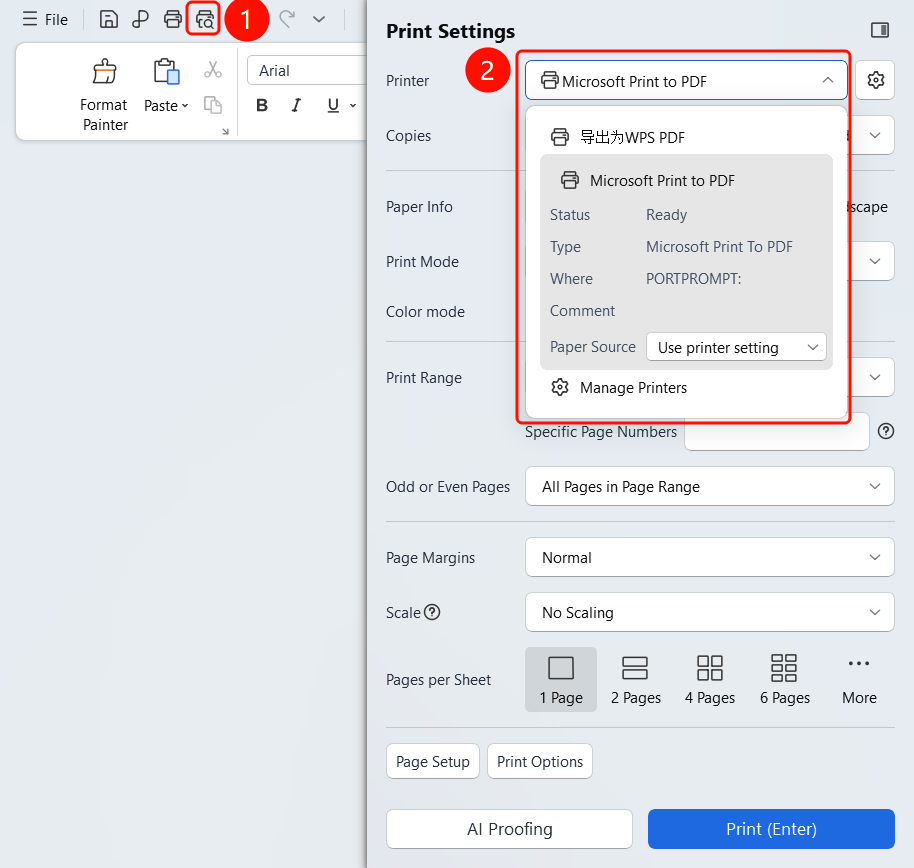
Top menu bar > Print button > Print Settings > Printer
Click the Print button in the top menu bar.
In the Print Settings panel, click the Printer drop-down list.
Select the target printer from the printer list.
View printer information:
- Export to WPS PDF
- System printers (such as Microsoft Print to PDF)
- Printer status, type, location, and remarks
Set the paper source.
Once selected, click OK to start printing.
FAQ
Q1: Can I print a document to PDF?
- Solution: Yes. Select the "Export to WPS PDF" or "Microsoft Print to PDF" printer.
Q2: How do I check the printer status?
- Solution: Select a printer from the printer list to view its status (such as Idle/Busy), type, location, and other information.
Q3: What should I do if the printer cannot be found?
- Solution: Check if the printer is properly connected, or add the printer in system settings.