Feature Summary
The VB Editor is the VBA (Visual Basic for Applications) macro development environment, enabling document processing automation by writing VBA code.
Feature Description
| Feature Dimension | Description |
|---|---|
| Version Restrictions - VBA Macros | On Windows, VBA plug-in must be installed before use. Not supported on Mac or mobile versions. |
Steps
Opening the VB Editor
Feature Entry
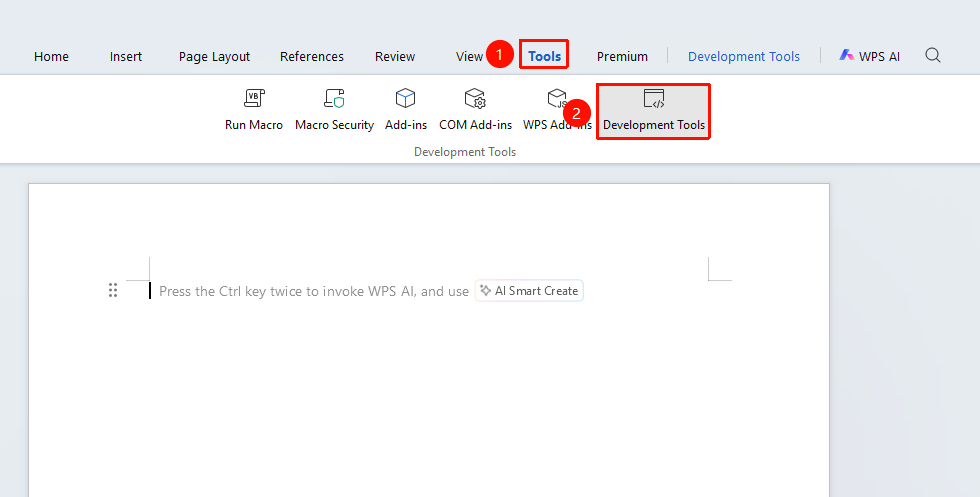
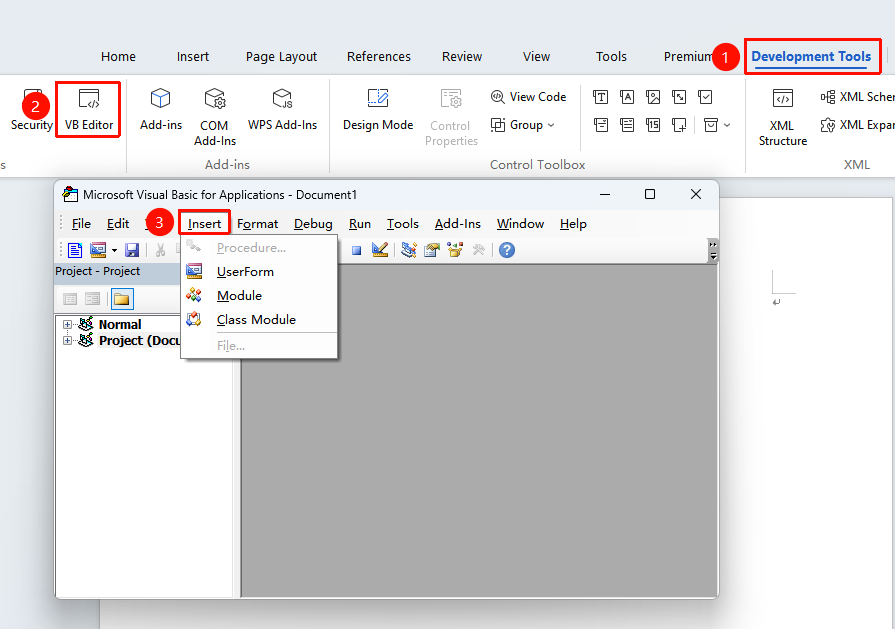
"Tools" tab → "Developer Tools" button → "Developer Tools" tab → "VB Editor" button
- Click the Developer Tools button in the Tools tab.
- Enter the Developer Tools tab and click the VBA Macro Editor button.
- In the project window on the left side of the editor, right-click the current document.
- Select Insert, then choose Module to create a new code module.
- Write VBA code in the module.
FAQ
Issue 1: Macros are disabled or run with errors
- Solution: Check macro security settings. Click "Developer Tools" → "Macro Security", set the security level to "Medium" or "Low", restart WPS, and try running the macro again.
Issue 2: Prompt "VBE6EXT.OLB cannot be loaded"
- Solution: This error occurs because the VBA installation files are incomplete. Check whether the VBA installation files under the path
C:\Program Files (x86)\Common Files\microsoft shared\VBAare complete. If not, uninstall and reinstall the VBA plug-in.
Notes
- Documents containing VBA macros must be saved in
.docmformat;.docxformat cannot save macro code.