Feature Summary
The Add-on feature supports loading official or third-party specialized plugins developed for WPS to extend the functionality of WPS Docs.
Feature Description
| Feature Dimension | Description |
|---|---|
| Membership Restriction | No membership restriction; available to all users |
| Version Restriction | Not supported on WPS versions for mobile devices |
Managing WPS Add-ons
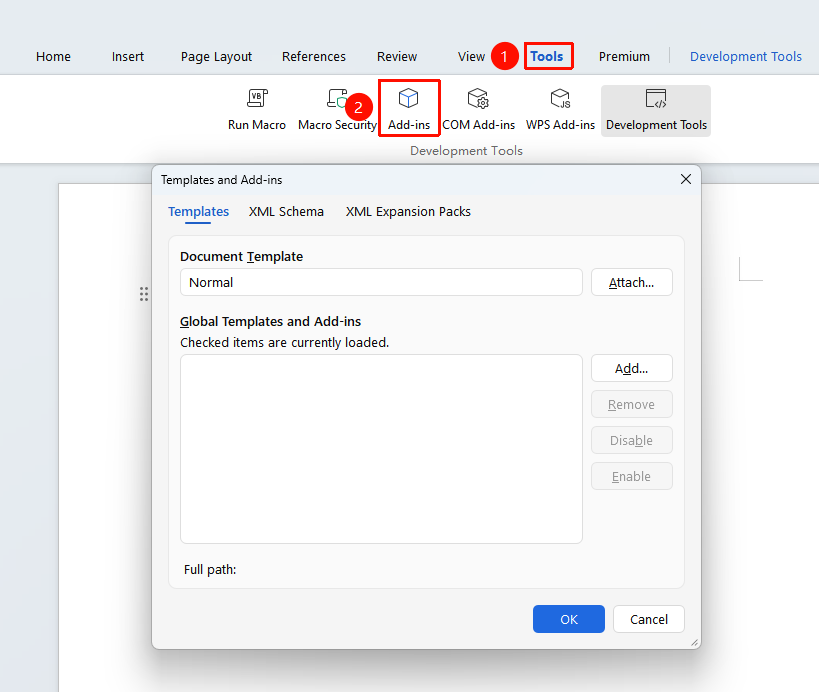
Feature Entry: "Tools" tab → "WPS Add-ons"
- Open the WPS Add-ons management interface
- View the list of installed WPS add-ons
- Select an add-on to enable, disable, or delete it
FAQ
Q1: Unable to install the WPS add-on?
- Solution: Check whether the add-on file format is correct and ensure the add-on file was downloaded from an official channel.
Q2: Cannot find the feature entry after installing the add-on?
- Solution:
- Some add-ons add a new tab to the ribbon; check again after restarting WPS.
- The bitness of the WPS add-on (32-bit/64-bit) must match the bitness of the computer system and the WPS client; obtain and install the corresponding bitness plugin from an official channel.
- To check the bitness of the WPS client: WPS client home page → "Global Settings" → "About WPS".
Notes
- It is recommended to download add-ons from the official WPS App Market
- Check the permission requirements of the add-on before installation
- Regularly check for add-on updates for the best experience