Feature Summary
The extension package feature is used to manage XML extension packages, which allow you to add custom XML schemas, namespaces, and transformation rules to extend the XML processing capabilities of WPS Text.
Feature Description
| Feature Dimension | Description |
|---|---|
| Membership Restriction | No membership restriction |
| Version Restriction | Requires WPS Office Professional Edition or higher |
Operation Steps
Opening Extension Package Management
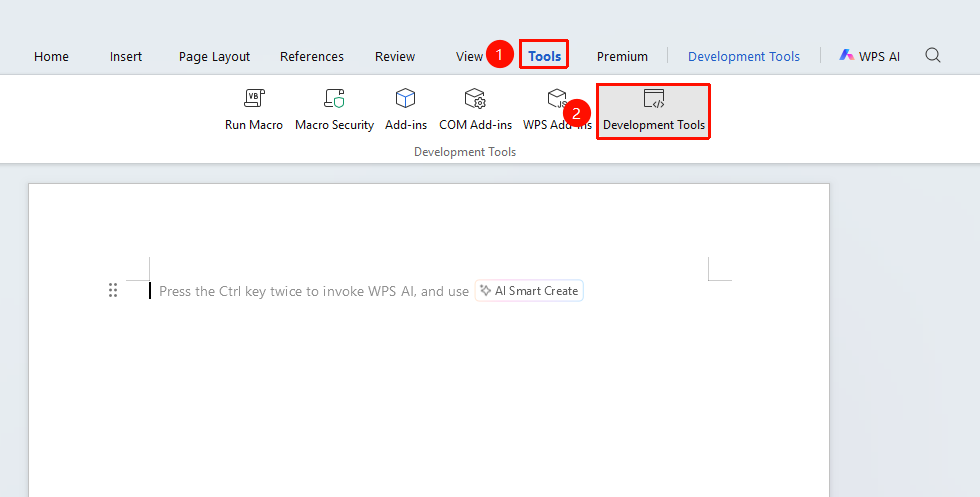
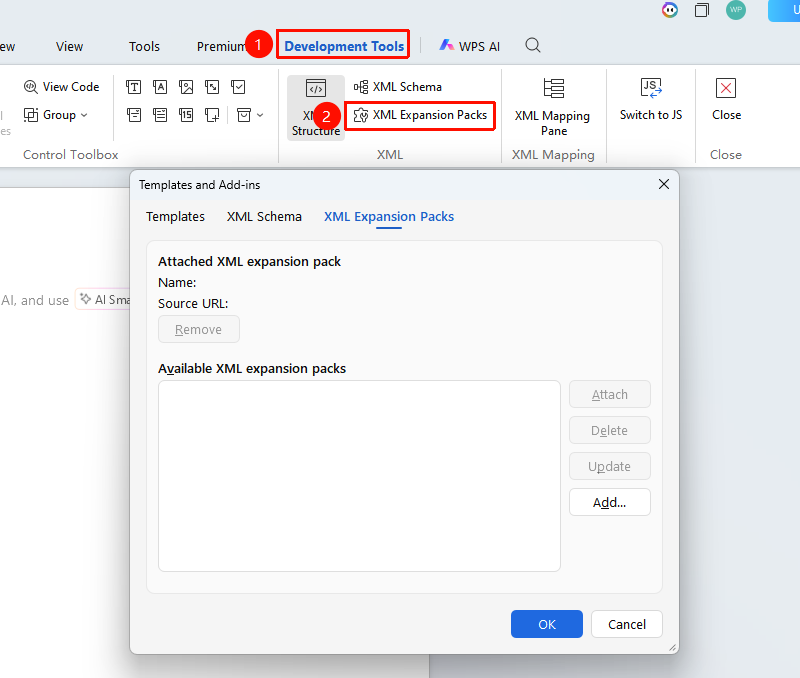
Feature Entry: "Tools" tab → "Developer Tools" button → "Developer Tools" tab → "Extension Package"
- Click the "Tools" tab at the top, locate and click the "Developer Tools" button to bring up the "Developer Tools" tab at the top
- Click the "Developer Tools" tab
- Click the "Extension Package" button in the "XML" function group
- Manage extension packages in the pop-up "Extension Package" dialog box
Adding an Extension Package
Feature Entry: "Developer Tools" tab → "Extension Package"
- Open the "Extension Package" dialog box
- Click the "Add" button
- Browse and select the extension package file (usually in .xml format)
- Click "Open" to complete the addition
Viewing Installed Extension Packages
Feature Entry: "Developer Tools" tab → "Extension Package"
- Open the "Extension Package" dialog box
- View the installed extension packages in the list
- You can view the name, version, and description information of the extension package
- You can enable or update specific extension packages
Deleting an Extension Package
Feature Entry: "Developer Tools" tab → "Extension Package" → "Delete"
- Open the "Extension Package" dialog box
- Select the extension package to delete
- Click the "Delete" button
- Confirm the deletion operation
Frequently Asked Questions
Question 1: Extension package installation failed?
- Solution: Check whether the extension package file format is correct and ensure the file is complete and not damaged.
Question 2: Extension package feature not working?
- Solution: Ensure the extension package is enabled (checked status), try restarting WPS and check again.
Question 3: Extension package conflict?
- Solution: If multiple extension packages define the same namespace, it may cause a conflict. Try disabling the conflicting extension packages.
Question 4: When installing the extension package, a prompt indicates that the file cannot be installed because of a security certificate issue. This XML extension package may not function as expected. For more information, contact your administrator.
- Solution: Certificate verification depends on the system time. If the computer time is incorrect, verification will fail.
- Recalibrate the computer time.
- If the extension package is in .xml format, try removing the signature verification;
- Delete the entire signature block within the extension package, save it, and then try reinstalling.
Notes
- Only obtain extension packages from official or trusted sources
- Extension packages typically contain XML schemas and transformation rules
- Extension packages can add custom XML functionality to documents
- Deleting an extension package will not affect document content that already uses its schema