Feature Summary
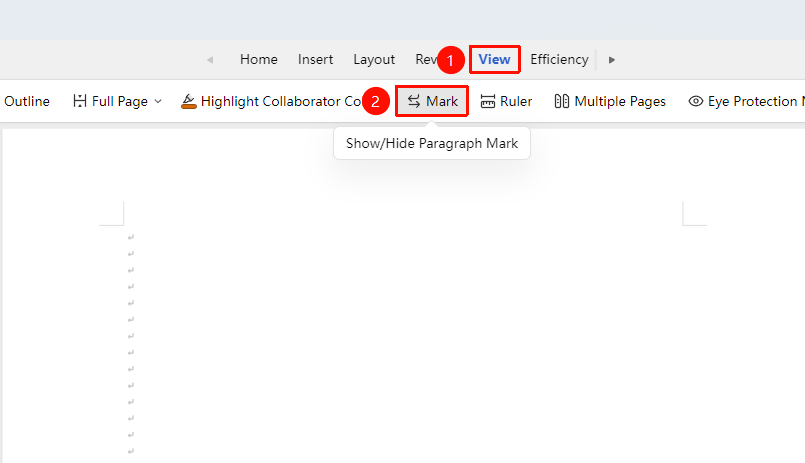
The markup feature is used to show or hide paragraph marks, making it easier to view the document's formatting settings.
Feature Description
| Feature Dimension | Description |
|---|---|
| Membership Restriction | No membership restriction |
| Version Restriction | No version restriction |
Operation Steps
Show/Hide All Marks
Feature Entry
"View" tab → "Show/Hide Editing Marks" button
- Click the "View" tab
- Click the "Show/Hide Editing Marks" button
- Once enabled, all formatting marks will be displayed
- Click again to hide all marks
Frequently Asked Questions
Question 1: Too many marks displayed, affecting readability
- Solution: Click the "Show/Hide Editing Marks" button to turn off mark display.
Notes
- Formatting marks will not be printed; they are only visible during editing
- In co-editing mode, the mark display setting only affects the current user