Feature Summary
The Format Painter is used to quickly copy and apply text formatting. It can apply formatting from one location to another, and is also available in collaboration mode, improving formatting efficiency.
Feature Description
| Feature Dimension | Description |
|---|---|
| Membership Restriction | No membership restriction |
| Version Restriction | No version restriction |
Operation Steps
Using Format Painter Once
Feature Entry
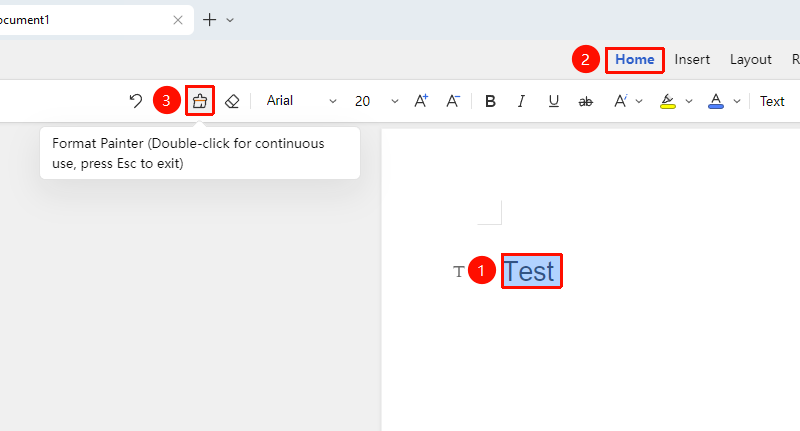
"Home" Tab → "Format Painter" Button
- Select the text with the desired formatting
- Click the "Format Painter" button in the Home tab
- The mouse pointer changes to a paintbrush shape
- Use the paintbrush to select the text to which you want to apply the formatting
- The formatting will be copied to the target text
Using Format Painter Continuously
Feature Entry
"Home" Tab → Double-click the "Format Painter" button
- Select the text with the desired formatting
- Double-click the "Format Painter" button
- The mouse pointer remains in paintbrush shape
- You can continuously select multiple sections of text to apply formatting
- Press the Esc key or click the Format Painter again to exit
Using the Floating Toolbar
Feature Entry
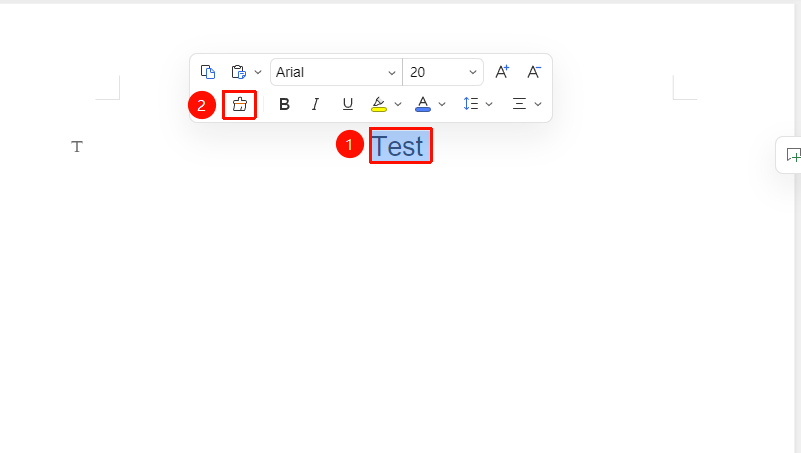
Select text → "Floating Toolbar" menu → "Format Painter" button
- Right-click after selecting text
- In the pop-up Floating Toolbar menu, click the "Format Painter" button
- Select the target text to apply the formatting
Frequently Asked Questions
Question 1: What formatting can the Format Painter copy?
- Solution: The Format Painter can copy all text formatting, including font, font size, color, bold, italic, underline, and paragraph formatting.
Question 2: How to use the Format Painter continuously?
- Solution: Double-click the Format Painter button to keep the Format Painter active and apply formatting continuously. Press the Esc key to exit.
Notes
- The Format Painter only copies formatting, not text content
- Double-click the Format Painter for continuous use; single-click for one-time use
- Press the Esc key to exit Format Painter mode at any time