Feature Summary
The Clear Formatting feature is used to quickly remove all formatting from text and restore it to the default format. It is also applicable in collaboration mode, making it convenient to unify document styles or reset formatting.
Feature Description
| Feature Dimension | Description |
|---|---|
| Membership Restriction | No membership restriction |
| Version Restriction | No version restriction |
Operation Steps
Using the Clear Formatting Feature
Feature Entry
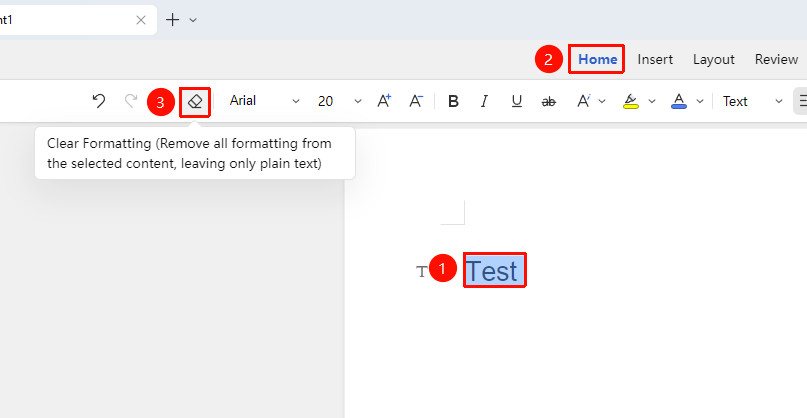
"Home" tab → "Clear Formatting" button
- Select the text from which you want to clear formatting
- Click the Clear Formatting button (eraser icon) in the Home tab
- All formatting of the selected text will be cleared
- The text will revert to the default "Normal" style
Frequently Asked Questions
Question 1: Will clearing formatting delete the text content?
- Solution: No. Clearing formatting only removes formatting settings; the text content will be fully retained.
Notes
- Clearing formatting will remove all formatting, including font, color, bold, italics, etc.
- After clearing formatting, the text will apply the default Normal style