Feature Summary
The paper size feature is used to set the dimensions of the document page, such as A4, A3, envelope, etc., ensuring that the document meets paper requirements when printing.
Feature Description
| Feature Dimension | Description |
|---|---|
| Membership Restriction | No membership restriction |
| Version Restriction | No version restriction |
Operation Steps
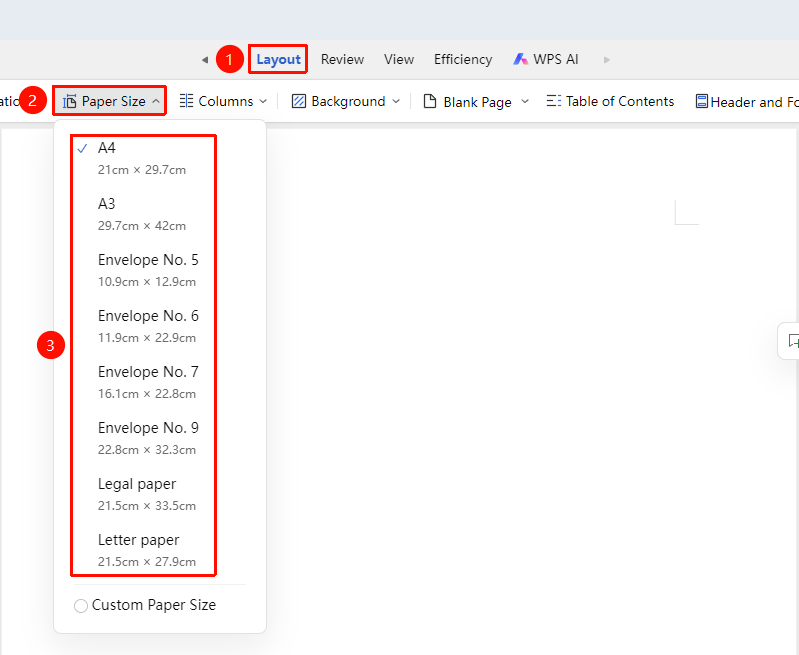
Set Preset Paper Size
Feature Entry
"Page" tab → "Paper Size"
- Click the "Page" tab
- Click the "Paper Size" button
- Select from preset options (A4, A3, #5 Envelope, etc.)
- The paper size will be applied to the document
Custom Paper Size
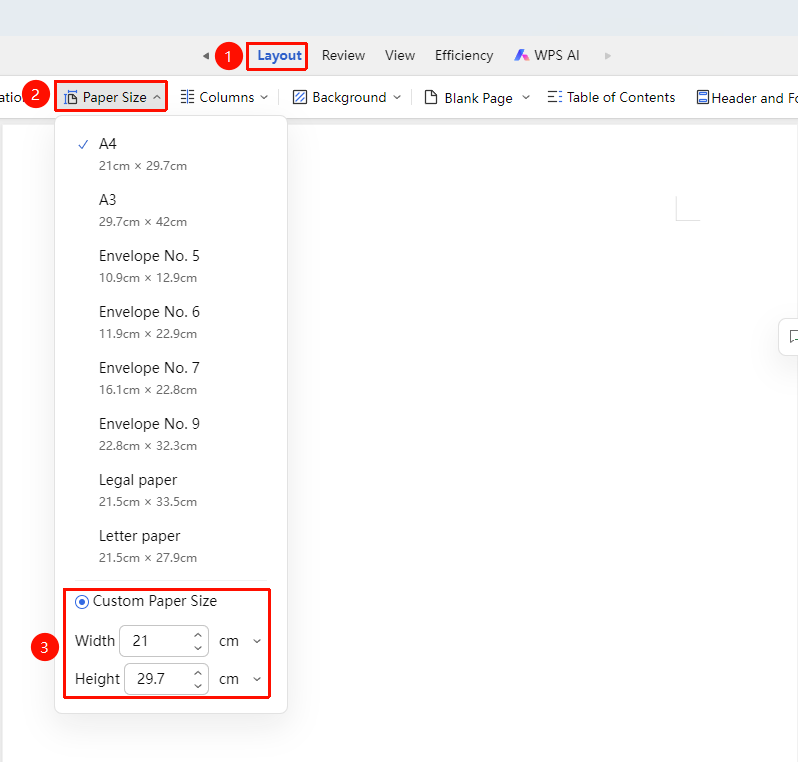
Feature Entry
"Page" tab → "Paper Size" → "Custom Paper Size"
- Click the "Page Layout" tab
- Click the "Paper Size" button
- Select "Custom Paper Size"
- Enter the custom width and height in the dialog box
Frequently Asked Questions
Question 1: Paper mismatch prompt when printing
- Solution: Ensure that the paper size set in the document matches the actual printer paper.
Question 2: How to set different paper sizes
- Solution: Use section breaks to divide the document into sections, then set different paper sizes in different sections.
Notes
- Common paper sizes: A4 (210×297mm), A3 (297×420mm)
- In collaboration mode, paper size settings will be synced to all collaborators
- Changing the paper size may affect document layout