Feature Summary
The alignment feature is used to set the horizontal position of paragraph text on the page, supporting left alignment, center alignment, right alignment, justified alignment, and distributed alignment, making document layout more standardized and visually appealing.
Feature Description
| Feature Dimension | Description |
|---|---|
| Membership Restriction | No membership restriction; available to all users |
| Version Restriction | Supported in all versions of WPS Office |
Operation Steps
Setting Alignment via the Toolbar
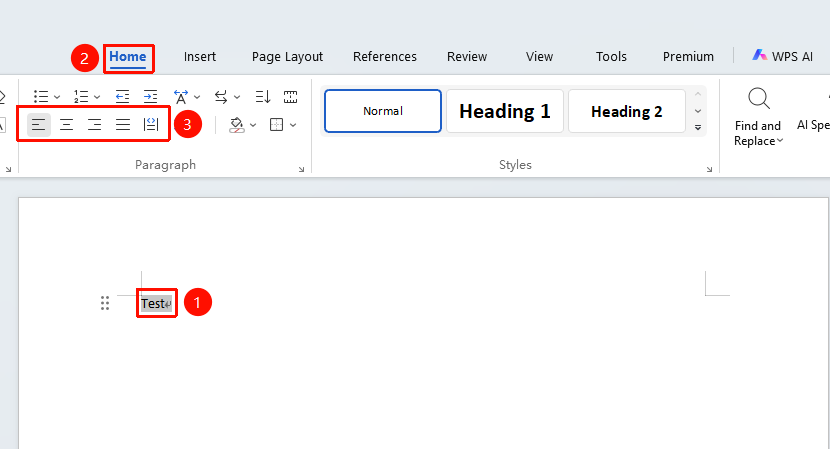
Feature Entry: "Home" tab → "Paragraph" → Alignment buttons
- Select the paragraph(s) to set alignment for
- Click the "Home" tab
- In the "Paragraph" group, choose an alignment method:
- Left Align: Text aligns to the left (Shortcut Ctrl+L)
- Center Align: Text centers on the page (Shortcut Ctrl+E)
- Right Align: Text aligns to the right (Shortcut Ctrl+R)
- Justify: Text aligns on both left and right (Shortcut Ctrl+J)
- Distributed: Text distributes evenly (Shortcut Ctrl+Shift+J)
Setting Alignment via the Paragraph Dialog Box
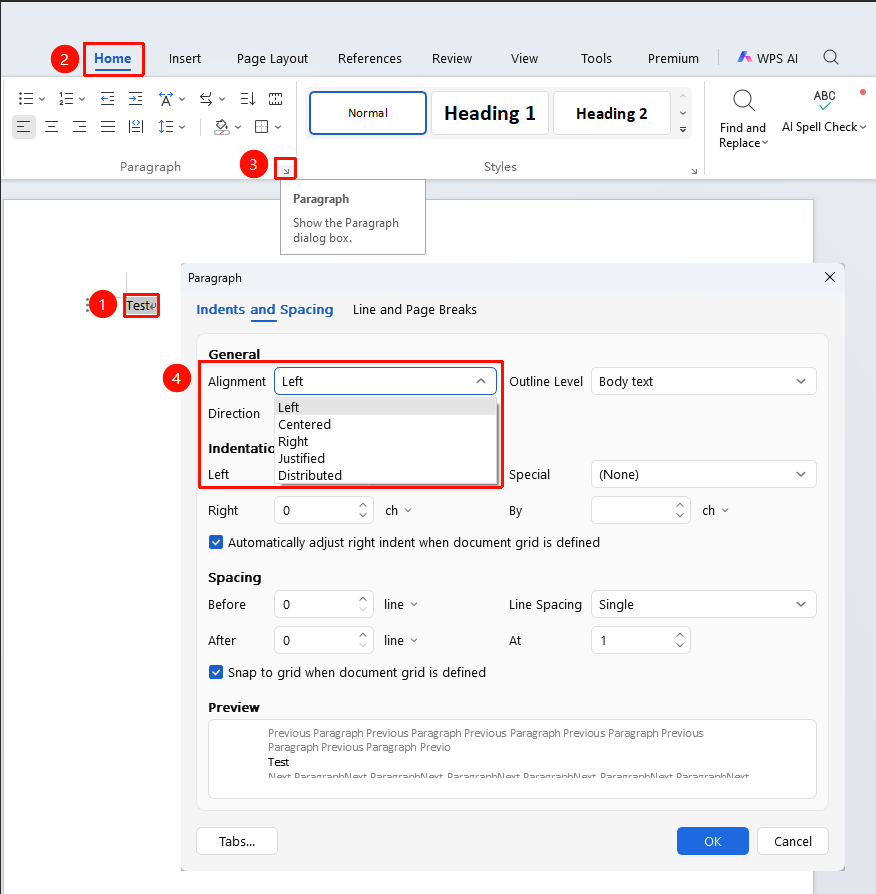
Feature Entry: "Home" tab → "Paragraph" → Expand button
- Select the paragraph(s) to set alignment for
- Click the "Home" tab
- In the "Paragraph" group, click the expand button in the lower-right corner
- In the "Indents and Spacing" tab, find "Alignment"
- Select an alignment method from the drop-down list
- Click "OK" to apply
Frequently Asked Questions
Q1: What is the difference between Justify and Distributed alignment?
- Solution: Justify keeps the last line left-aligned, while Distributed aligns all lines (including the last line) on both left and right.
Q2: What alignment should be used for titles?
- Solution: Titles typically use center alignment to display the title centered on the page.
Q3: Why is the text not centered after setting center alignment?
- Solution: Check if the paragraph has indentation; indentation can affect the alignment effect. You can set the indentation to 0.
Notes
- Alignment is a paragraph-level setting and affects the entire paragraph
- Body text typically uses justified alignment for a neater layout
- Titles typically use center alignment
- You can use the Format Painter to quickly copy alignment formatting