Feature Summary
The View Code feature opens the VBA editor, allowing users to write and edit macro code for office automation and complex function customization.
Feature Description
| Feature Dimension | Description |
|---|---|
| Membership Restriction | No membership restriction |
| Version Restriction | No version restriction |
Operation Steps
Opening the VBA Editor
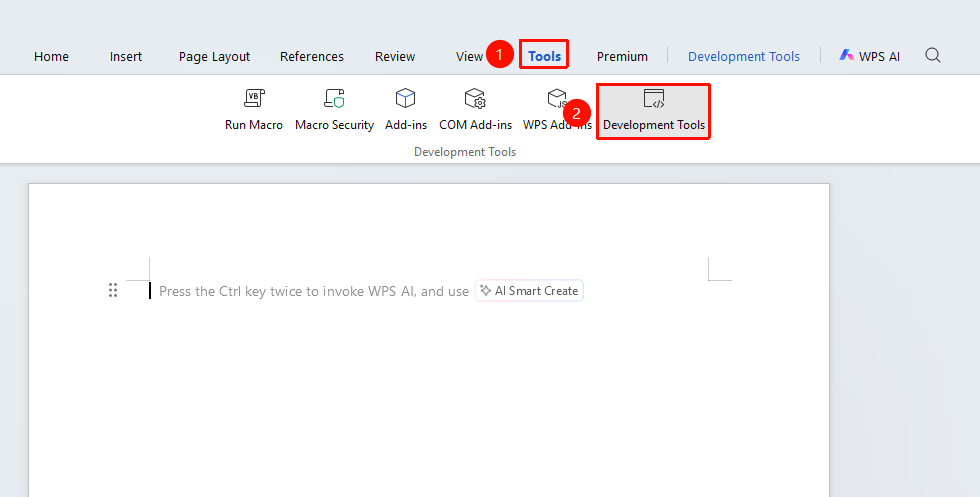
Feature Entry: "Tools" tab → "Developer Tools" button → "Developer Tools" tab → "View Code"
- Click the "Tools" tab at the top, locate and click the "Developer Tools" button to bring up the "Developer Tools" tab at the top
- Click the "Developer Tools" tab on the ribbon
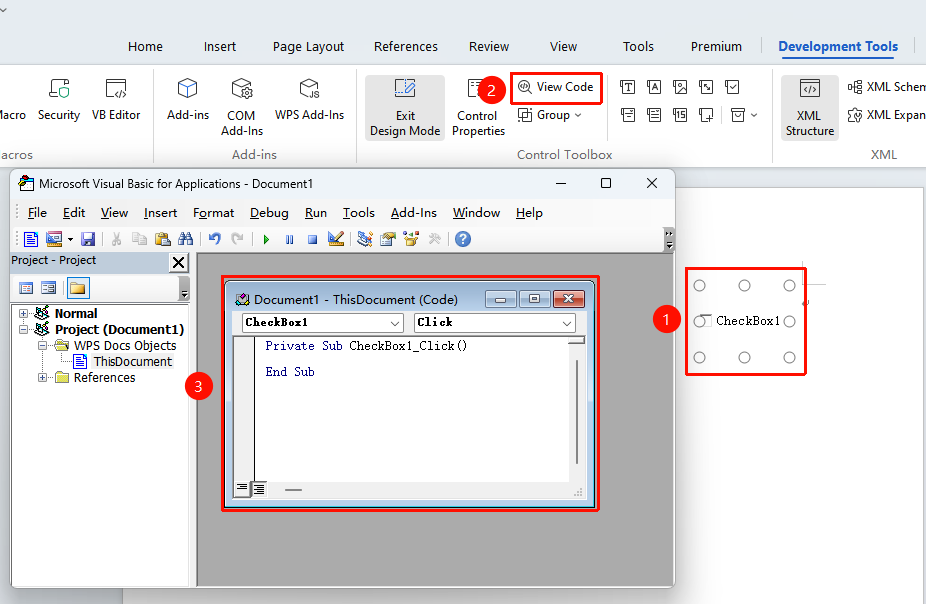
- Click the "View Code" button
- The system will open the VBA editor window
Writing Code in the VBA Editor
Feature Entry
- Enter the VBA editor
- Select the module to edit in the project window on the left
- Write or modify code in the code window on the right
- Press F5 to run the code for testing
Frequently Asked Questions
Question 1: The View Code button is grayed out and unavailable?
- Solution: Check whether the macro feature is enabled. Set macro security in "File" → "Options" → "Trust Center".
Question 2: The VBA editor cannot be opened?
- Solution: Ensure the local macro environment is complete. It is recommended to completely uninstall the VBA plugin and then reinstall it.
Notes
- It is recommended to back up the document before writing macro code
- Confirm the security of macro code written by others before running it
- It is recommended to learn basic VBA syntax before writing code