Feature Summary
The Run Macro feature is used to execute recorded or written JS macro code and VBA macro code, enabling automation of document operations and improving the efficiency of repetitive tasks.
Feature Description
| Feature Dimension | Description |
|---|---|
| Membership Restrictions | No membership restrictions; available to all users |
| Version Restrictions | VBA macro code is only supported on Windows; not supported on Mac |
Operation Steps
Run Macro
Feature Entry
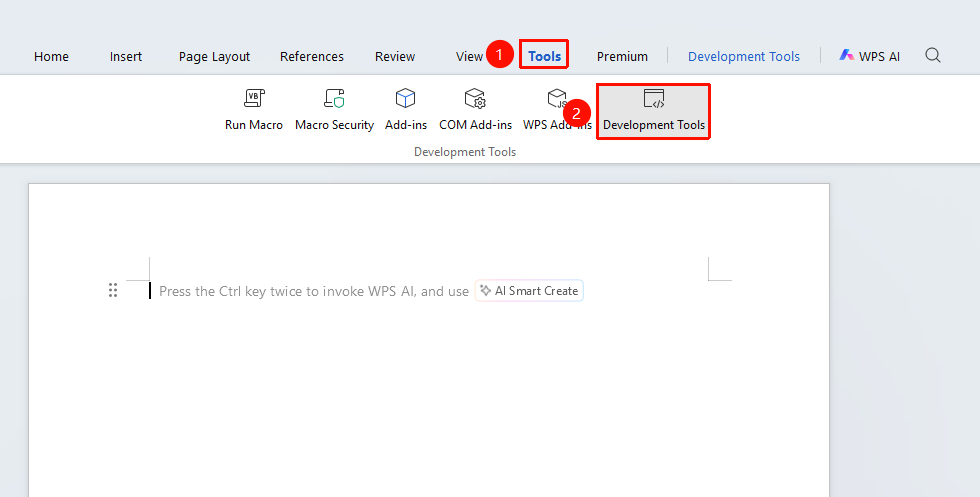
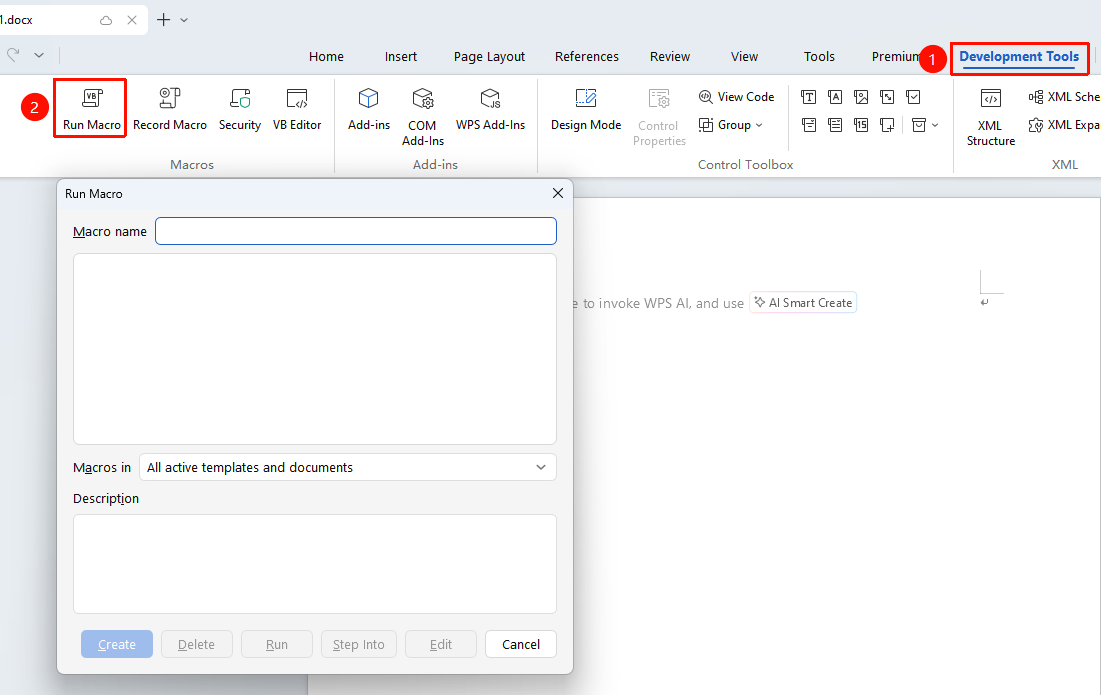
"Tools" tab → "Developer Tools" tab → "Run Macro" button
- Click the Developer Tools button in the Tools tab
- Enter the Developer Tools tab and click the "Run Macro" button
- In the pop-up dialog, select the macro to run
- Click the Run button to execute the macro
- The macro will automatically complete the preset operations
FAQ
Issue 1: Macro cannot run
- Solution: Check the macro security settings. You can adjust the macro security level appropriately and then try running it again. Path: Developer Tools → Macro Security.
Notes
- Confirm that the macro source is reliable before running
- Macros may pose security risks; enable unknown macros with caution