Feature Summary
The drop cap feature enlarges the first character of a paragraph and supports two styles: dropped and in-margin. It is commonly used for decorative formatting at the beginning of a document.
Feature Description
| Feature Dimension | Description |
|---|---|
| Membership Restriction | No membership restriction; available to all users |
| Version Restriction | No version restriction; supported in all versions of WPS Docs |
Operation Steps
Setting a Drop Cap
Feature Entry
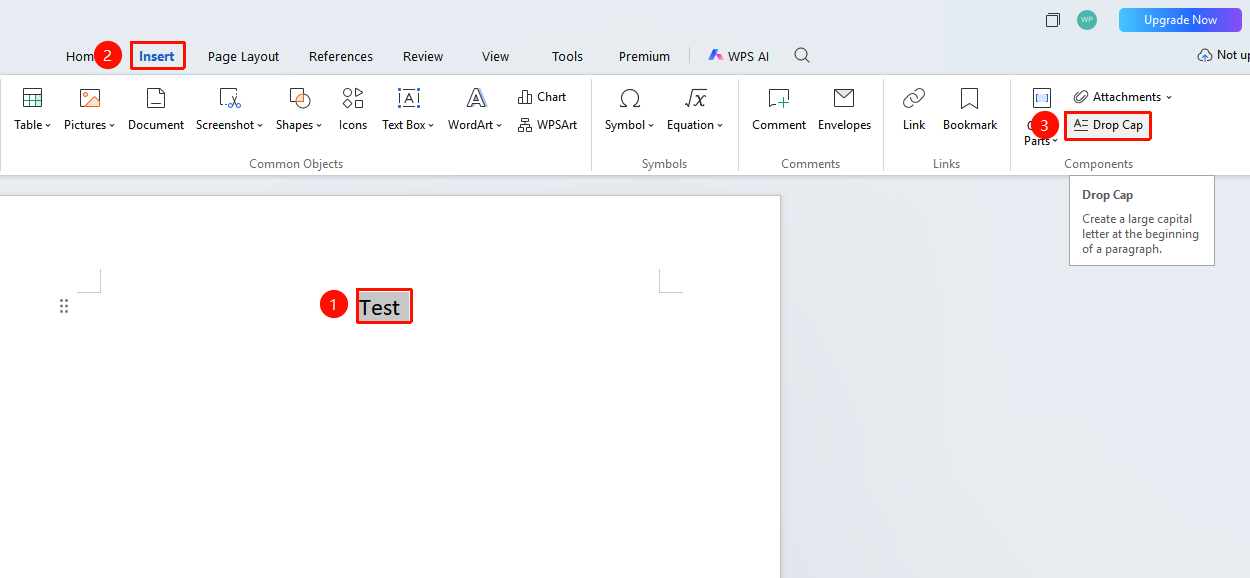
"Insert" tab → "Drop Cap" option
- Select the paragraph where you want to set a drop cap (or place the cursor within that paragraph)
- Click the Insert tab and locate the "Drop Cap" button
Frequently Asked Questions
Q1: Drop cap setting does not take effect
- Solution: Ensure that the first character of the paragraph is not a space, tab, or paragraph mark. Remove any extra blank characters before applying the setting.
Q2: How to remove a drop cap
- Solution: Select the paragraph with the drop cap applied, click "Drop Cap", and choose "None" to remove it.