Feature Summary
WPS Docs Mail Merge supports highlighting merge fields, adding shading to merge fields for easy identification and editing.
Feature Details
| Feature Dimension | Description |
|---|---|
| Membership restrictions | No restrictions |
| Version restrictions | No restrictions |
Steps
Set Highlight Merge Fields via the Mail Merge Tab
Feature Entry
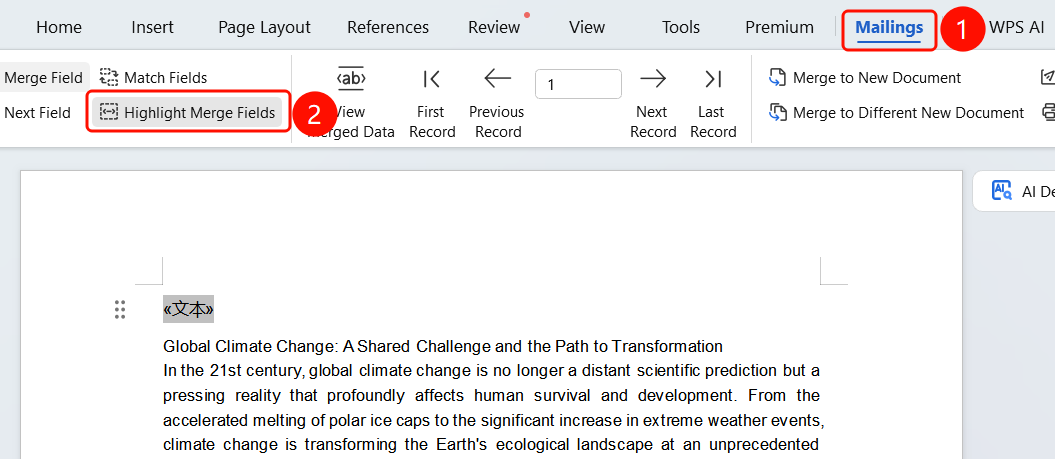
Mail Merge tab > Highlight Merge Fields button
- Click the Mail Merge tab in the top menu bar.
- Click the Highlight Merge Fields button.
- Merge fields will be displayed with gray shading for easy identification.
- Click it again to hide the shading.
FAQ
Q1: What is the purpose of highlighting merge fields?
- Solution: Shading helps you quickly identify the location of merge fields in the document for easy editing.
Q2: Will the shading be printed?
- Solution: No. Shading is only for screen display and will not affect printing.
Q3: How do I hide the shading?
- Solution: Click the Highlight Merge Fields button again to hide the shading.
Notes
- Highlighting merge fields is only used to assist editing.