Feature Summary
Mail Merge in WPS Docs supports inserting Next fields to display data from multiple records on the same page.
Feature Details
| Feature Dimension | Description |
|---|---|
| Premium Restrictions | None |
| Version Restrictions | None |
Steps
Insert Next Fields via the Mail Merge Tab
Feature Entry
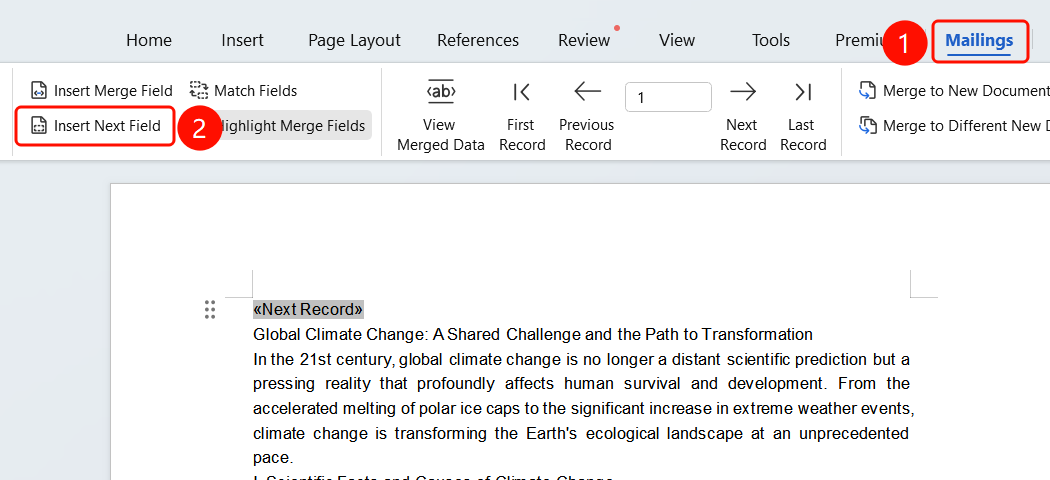
Mail Merge tab > Insert Next Field button
- Position the cursor where you want to insert the Next field.
- Click the Mail Merge tab in the top menu bar.
- Click the Insert Next Field button.
- The Next field will be inserted into the document.
FAQ
Q1: What is the purpose of the Next field?
- Solution: The Next field is used to display data from multiple records on the same page, automatically switching to the next record during the merge.
Q2: What is the difference between a Next field and a standard merge field?
- Solution: A standard merge field displays data from the current record, while a Next field is used to switch to the next record.
Q3: How do I display multiple records on the same page?
- Solution: Insert a Next field after the merge fields of each record to display multiple records on the same page.
Notes
- Next fields are primarily used when you need to display multiple records on the same page.
- Proper use of Next fields can improve document formatting efficiency.