Feature Summary
Mail Merge in WPS Docs supports recipient management, allowing you to view, edit, and filter recipient information in the data source.
Feature Specifications
| Feature Dimension | Description |
|---|---|
| Premium Limitations | None |
| Version Limitations | None |
Steps
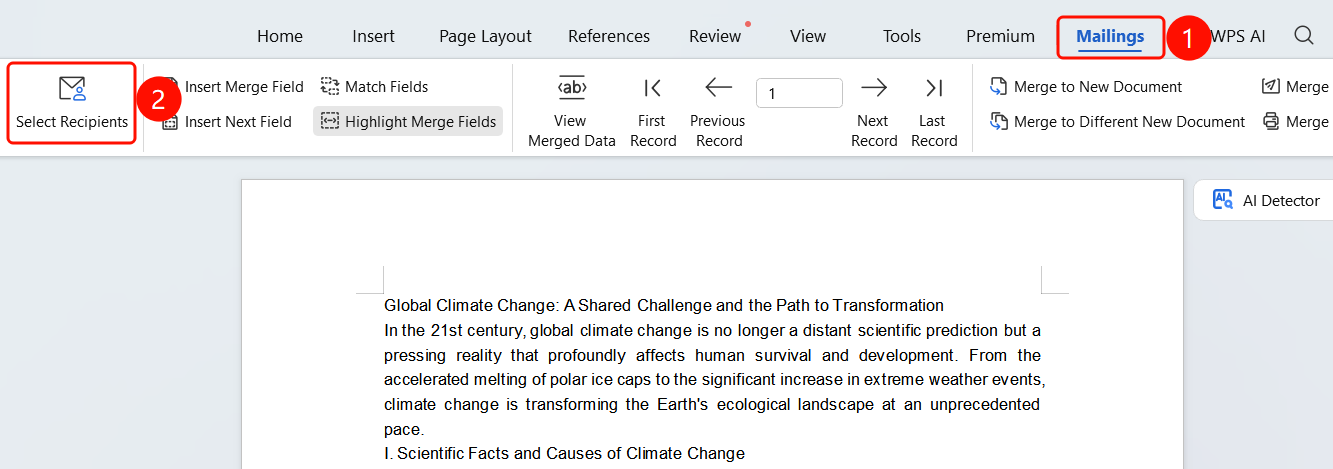
Manage recipients via the Mail Merge tab
Feature Entry
Mail Merge tab > Recipients button
- Click the Mail Merge tab in the top menu bar.
- Click the Recipients button.
- Click OK to complete the settings.
FAQ
Q1: Can I deselect certain recipients?
- Solution: Yes. You can deselect the recipients you do not need in the recipient list.
Q2: How do I filter specific recipients?
- Solution: Use the filter feature in the recipient list to filter recipients by criteria.
Q3: Can recipient information be modified?
- Solution: Yes. Click the edit button in the recipient list to modify recipient information.
Notes
- Recipient management is an important part of Mail Merge.
- Filtering recipients properly can improve merge efficiency.