Feature Summary
WPS Docs Mail Merge supports data source management. You can connect to local or cloud data files via "Open Data Source" or disconnect the current data connection via "Close Data Source".
Feature Description
| Feature Dimension | Description |
|---|---|
| Premium Limit | No premium limit |
| Version Limit | No version limit |
Steps
Open Data Source
Feature Entry
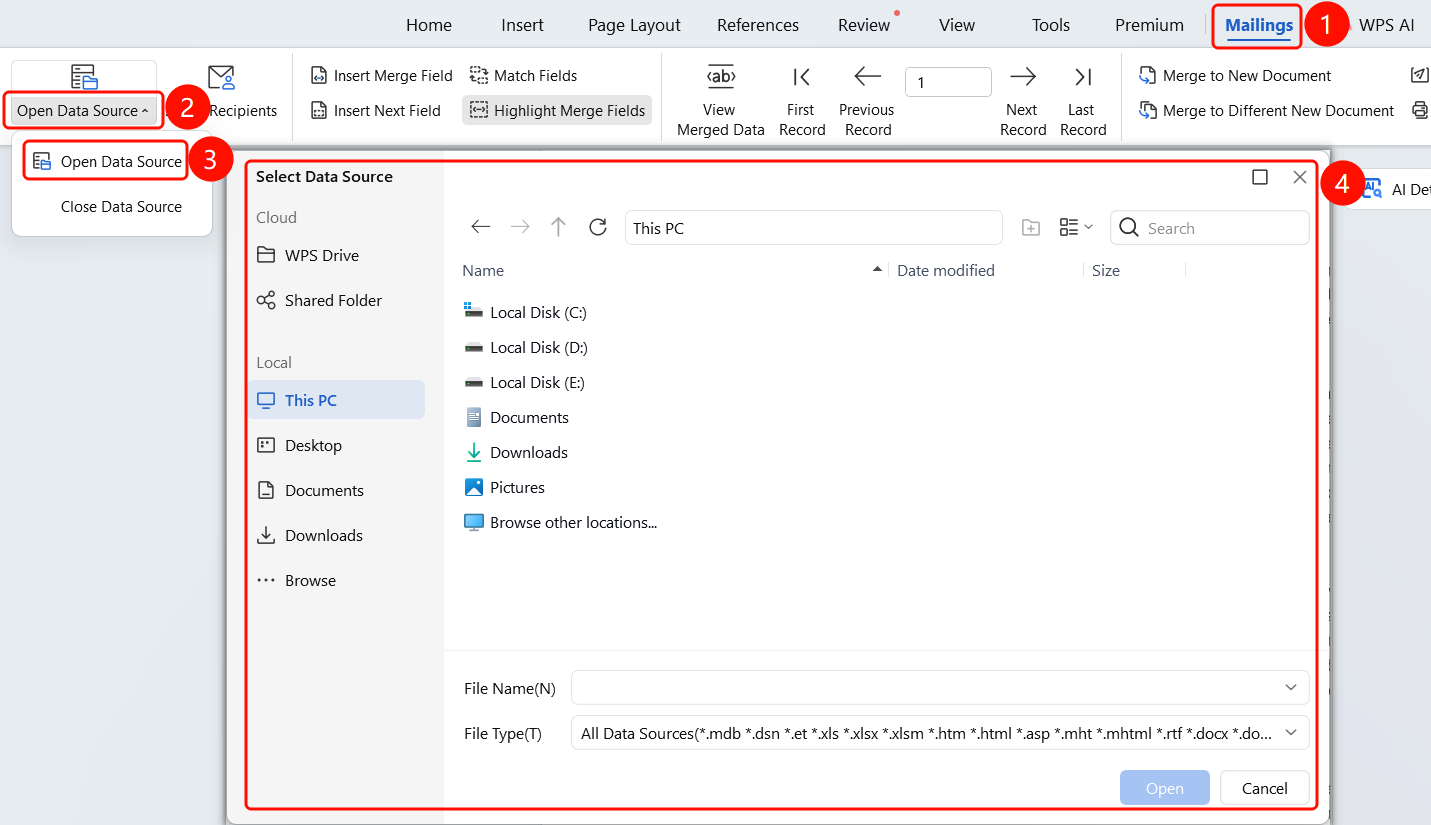
Mail Merge tab → Open Data Source button → Open Data Source (&E) option
- Click the Mail Merge tab in the top menu bar.
- Click the Open Data Source button to expand the drop-down menu.
- In the drop-down menu, click the Open Data Source (&E) option.
- In the pop-up Select Data Source dialog box, select the location of your data source file. It supports cloud locations (WPS Drive, Shared Folders, Google, Dropbox) or local locations (This PC, Desktop, Documents, Downloads, Browse).
- Confirm the data source format in the File Type drop-down list. Supported formats include .mdb, .dsn, .et, .xls, .xlsx, .xlsm, .htm, .html, .asp, .mht, .mhtml, and .rtf.
- After selecting the target file, click the Open (&O) button to complete the data source connection.
Close Data Source
Feature Entry
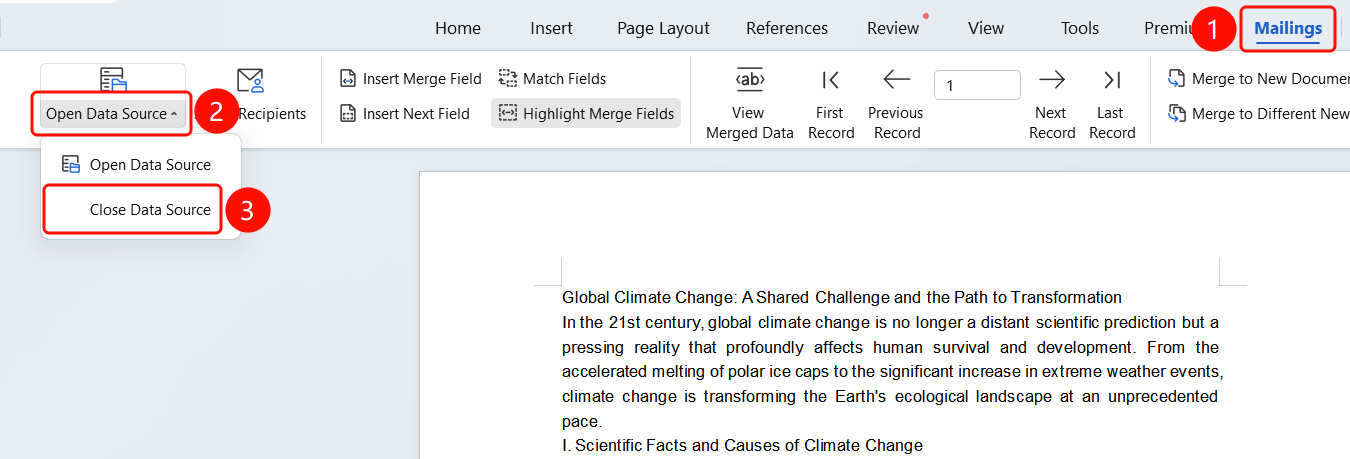
Mail Merge tab → Open Data Source button → Close Data Source (&C) option
- Click the Mail Merge tab in the top menu bar.
- Click the Open Data Source button to expand the drop-down menu.
- In the drop-down menu, click the Close Data Source (&C) option to disconnect the current data source.
FAQ
Q1: What data source formats are supported?
- Solution: Multiple formats are supported, including .mdb, .dsn, .et, .xls, .xlsx, .xlsm, .htm, .html, .asp, .mht, .mhtml, and .rtf. It is recommended to use Excel sheets (.xlsx) as the data source for easy editing and management.
Q2: How do I change the data source?
- Solution: Disconnect the current connection via Close Data Source (&C), and then select a new data file via Open Data Source (&E).
Q3: Can I select cloud files as the data source?
- Solution: Yes. On the left side of the Select Data Source dialog box, you can select cloud locations such as WPS Drive, Shared Folders, Google, and Dropbox, or select files from your local computer.
Notes
- Data source files must maintain standard formatting, and headers should be clear and definite.
- Once the data source is closed, you will not be able to preview data in the inserted merge fields. You must reopen the data source.
- It is recommended to confirm that the file is not in use by another program before connecting to the data source.