Feature Summary
Mail Merge in WPS Docs supports email configuration, allowing you to set up email account information for merging and sending emails.
Feature Description
| Feature Dimension | Description |
|---|---|
| Membership restrictions | None |
| Version restrictions | None |
Steps
Configure Email via the Mail Merge Tab
Feature Entry
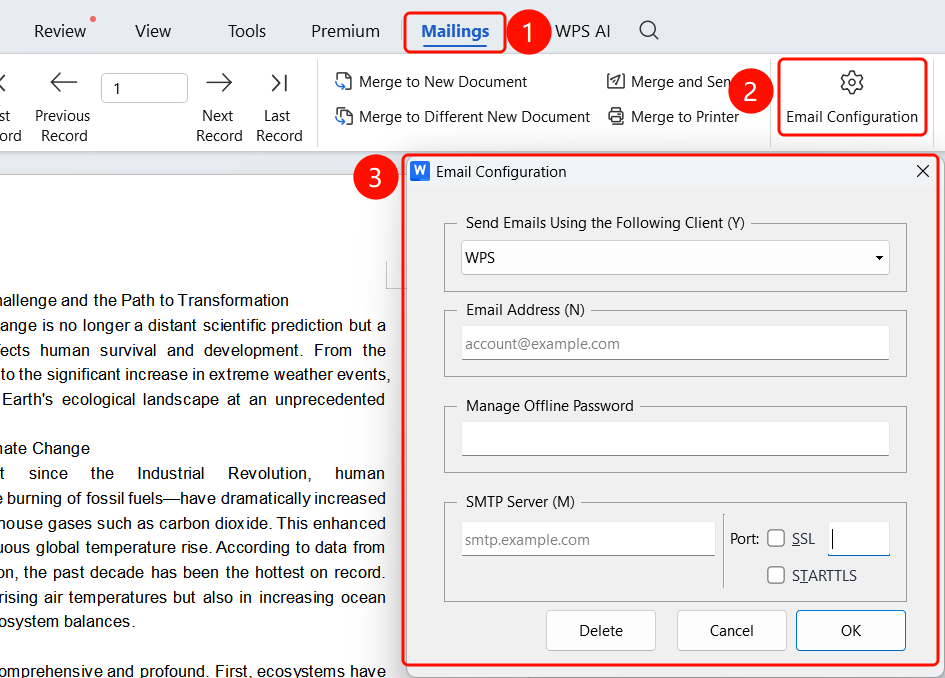
Mail Merge tab > Email Configuration button
- Click the Mail Merge tab in the top menu bar.
- Click the Email Configuration button.
- Fill in your email information in the dialog box that appears.
- Click OK to save the configuration.
FAQ
Q1: How do I get SMTP server information?
- Solution: Contact your email service provider or check the server information in your email settings.
Q2: What should I do if the connection test fails?
- Solution: Check if your username, password, and server information are correct, and make sure your network connection is normal.
Q3: Will my configuration information be saved?
- Solution: Yes, the configuration information will be saved locally so you do not need to reconfigure it next time.
Notes
- Email configuration is required to use the merge and send feature.
- We recommend using an organization email for a better sending experience.