Feature Summary
The single-page/multi-page display feature allows you to adjust the page view mode of a document, making it convenient to view single-page or multi-page content as needed.
Feature Description
| Feature Dimension | Description |
|---|---|
| Membership Restriction | No membership restriction; available to all users |
| Version Restriction | No version restriction; supported across all WPS client versions |
Operation Steps
1. Switch Display Mode
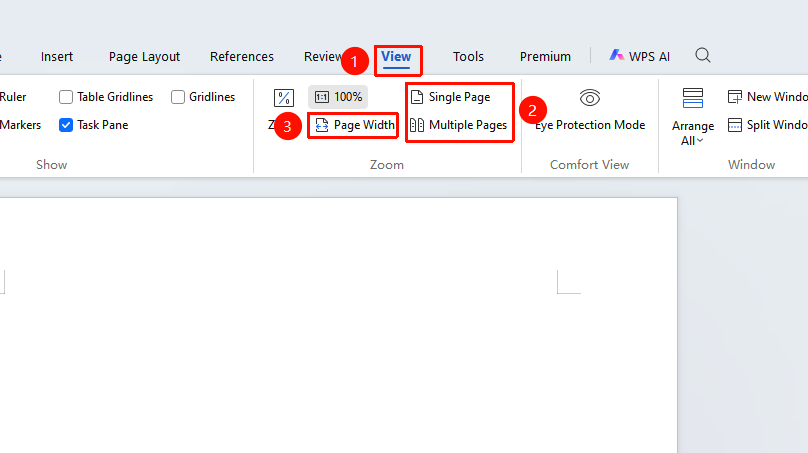
- Click the "View" tab in the top menu bar
- In the "Window" group, select:
- Single Page: Display only one page at a time
- Multiple Pages: Display multiple pages simultaneously
- Page Width: Fit the page width to the window
FAQ
- Q1: Pages appear too small in multi-page view
- Solution: Adjust the zoom ratio or use the "Page Width" mode
Notes
- Multi-page view is suitable for reviewing the overall document layout
- Single-page view is suitable for focused editing of the current page
- The display mode does not affect the actual print output