Feature Summary
The Text Direction feature is used to set the orientation of text in a document, supporting both horizontal and vertical layouts to meet various formatting needs.
Feature Description
| Feature Dimension | Description |
|---|---|
| Membership Restriction | No membership restriction; available to all users |
| Version Restriction | No version restriction; supported in all versions of WPS Docs |
Operation Steps
Setting Text Direction
Feature Entry
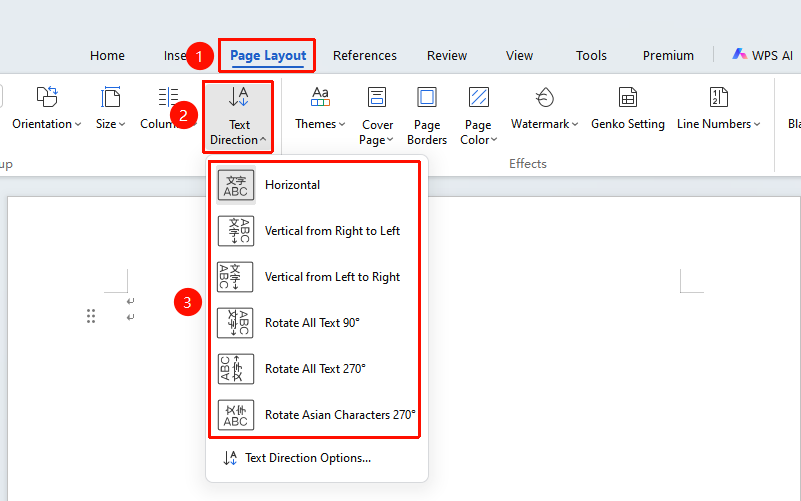
"Page" tab → "Text Direction" drop-down menu
- Click the "Text Direction" drop-down menu in the Page tab
- Select a preset direction
Custom Text Direction
Feature Entry
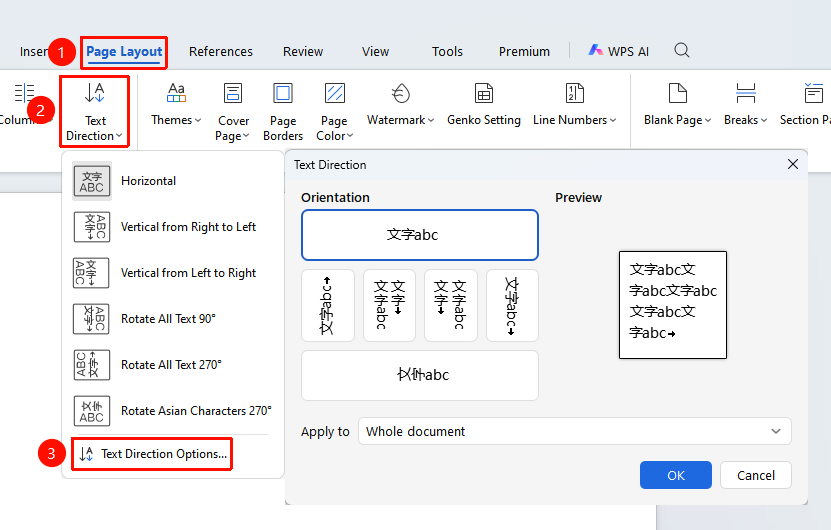
"Page" tab → "Text Direction" drop-down menu → "Text Direction Options" option
- Click the Text Direction drop-down menu in the Page tab
- In the drop-down menu, select "Text Direction Options"
- In the pop-up dialog box, choose the text display orientation
- Set the application scope: Whole document or After insertion point
- Click OK to complete the setting