Feature Summary
The document grid feature is used to set the number of lines and characters in a document, controlling the amount of content displayed per page. It is suitable for official document formatting, thesis formatting requirements, and similar scenarios.
Feature Description
| Feature Dimension | Description |
|---|---|
| Membership Restriction | No membership restriction |
| Version Restriction | No version restriction |
Operation Steps
Setting the Document Grid
Feature Entry
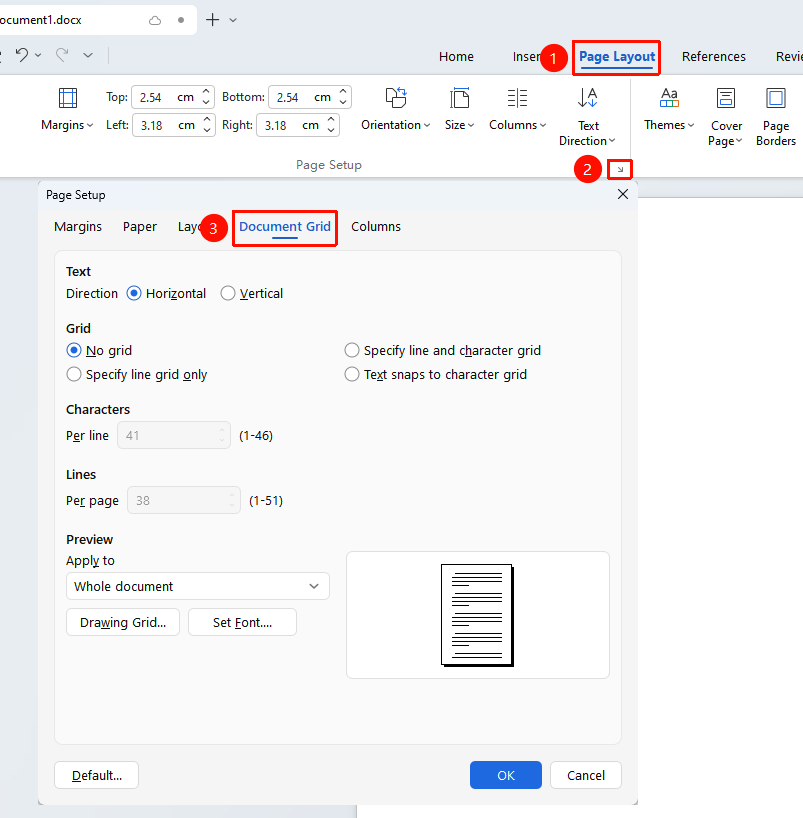
"Page" tab → "Page Setup" arrow → "Document Grid" tab
- Click the Page Setup arrow in the Page tab to open the Page Setup dialog box.
- In the Page Setup dialog box, switch to the "Document Grid" tab.
- Select the text direction.
- Select the grid type:
- No Grid: No line or character restrictions are set.
- Specify Line Grid Only: Only set the number of lines per page.
- Specify Line and Character Grid: Set both the number of lines per page and the number of characters per line.
- Text Aligns to Character Grid: Text automatically aligns to the character grid.
- Set the number of characters per line and the number of lines per page.
- Set the application scope:
- Whole Document
- After Insertion Point
- Selected Text
- Click OK to apply the settings.