Feature Summary
The Page Layout feature is used to set the document's page layout, including header and footer positions, vertical alignment, etc., helping users quickly adjust the overall appearance of the document.
Feature Description
| Feature Dimension | Description |
|---|---|
| Membership Restriction | No membership restriction |
| Version Restriction | No version restriction |
Operation Steps
Setting Page Layout
Feature Entry
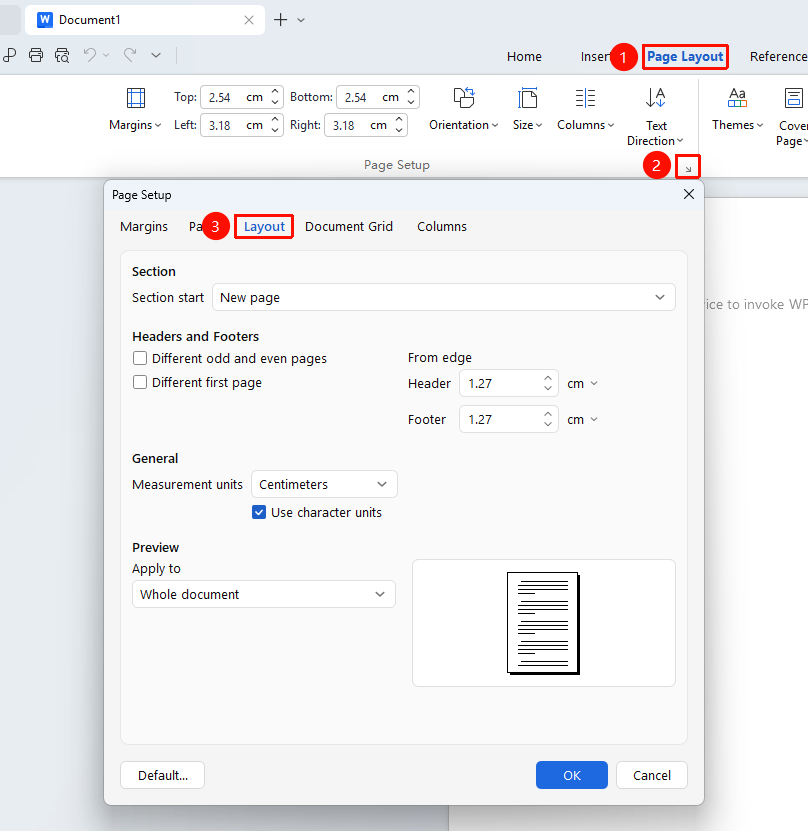
"Page" tab → "Page Setup" arrow, opens the Page Setup dialog → "Layout" tab
- Click the Page Setup arrow in the Page tab to open the Page Setup dialog
- In the Page Setup dialog, switch to the "Layout" tab
- Set the following options:
- Section start: Controls where a new section begins
- Headers and footers: Set different first page, different odd and even pages
- From edge: Distance of header from top edge of page, distance of footer from bottom edge of page
- Apply to: Whole document, Selected text, After insertion point
- Click OK to apply the settings
FAQ
Q1: Unable to set the first page header separately
- Solution: Check the "Different first page" option in the Layout tab to set an independent header and footer for the first page.
Notes
- Page layout settings are usually based on "sections"; different sections can have different layouts
- The different odd and even pages feature is commonly used in book typesetting