Feature Summary
The manuscript paper feature allows you to set the document to a composition manuscript paper format, displaying a grid or horizontal lines, suitable for writing practice and Chinese text layout.
Feature Description
| Feature Dimension | Description |
|---|---|
| Membership Restriction | No membership restriction; available to all users |
| Version Restriction | No version restriction; supported in all versions of WPS Docs |
Operation Steps
Setting Manuscript Paper Format
Feature Entry
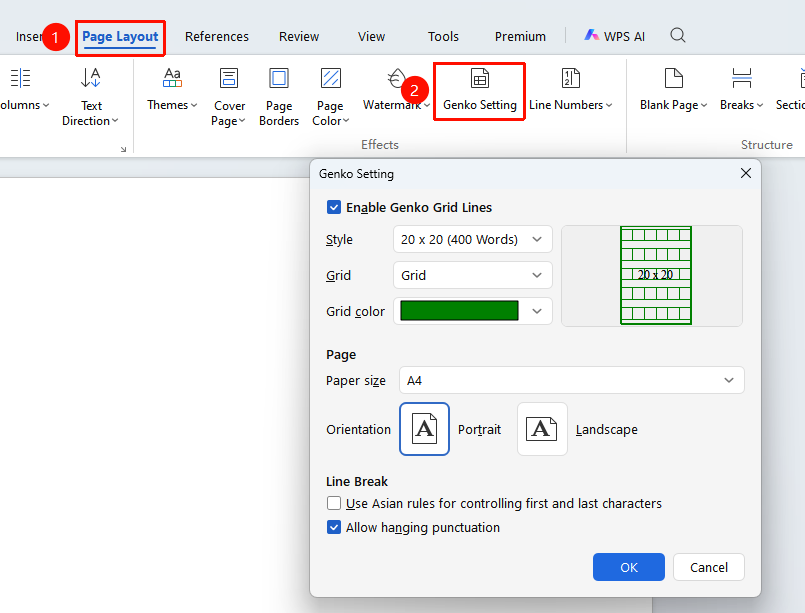
"Page" tab → "Manuscript Paper" button
- Click the "Manuscript Paper" button in the Page tab
- In the pop-up dialog, check "Use manuscript paper mode"
- Set the specifications: e.g., 20×20, 15×20, etc.
- Select the grid type: grid manuscript paper or lined manuscript paper
- Set the grid color and line style
- Click OK to apply
FAQ
Q1: How to cancel the manuscript paper format
- Solution: Open the manuscript paper settings dialog and uncheck "Use manuscript paper".
Notes
- In manuscript paper mode, text will automatically align to the grid
- The manuscript paper format will change the document's layout method