Feature Summary
The gridlines feature displays a reference grid on the document page, helping users precisely align objects such as text, images, and shapes. It is suitable for scenarios requiring precise layout.
Feature Description
| Feature Dimension | Description |
|---|---|
| Membership Restrictions | No membership restrictions |
| Version Restrictions | No version restrictions |
Operation Steps
Show/Hide Gridlines
Feature Entry
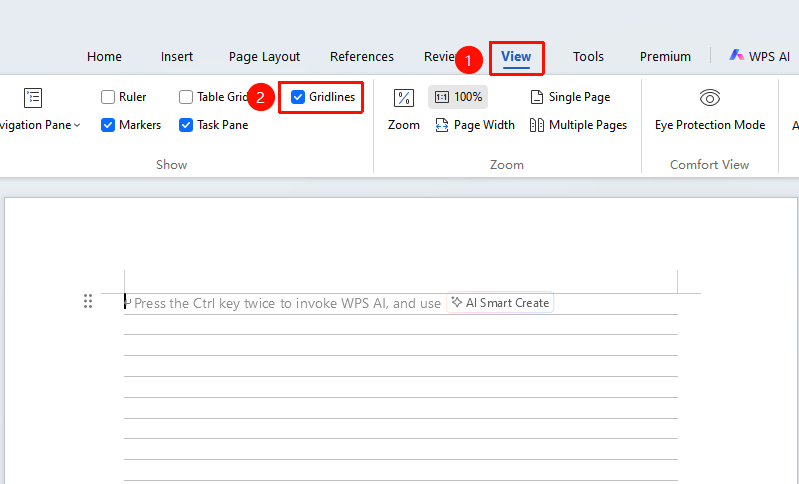
"View" tab → "Gridlines"
- Open a WPS Text document
- Click the "View" tab in the top menu bar
- Check the "Gridlines" checkbox to display gridlines
- Uncheck it to hide gridlines
Frequently Asked Questions
Question 1: What should I do if the gridlines are printed?
- Solution: Gridlines are not printed by default. If gridlines appear when printing, please hide the "Gridlines" before printing, or check whether the "Print gridlines" option is selected in the print settings.
Notes
- Gridlines are for layout reference only and will not be printed
- Gridlines can help precisely align various objects in the document
- Grid spacing can be adjusted as needed to suit different layout requirements