Feature Summary
When you process sheet data and need a large number of repetitive manual operations on text, cells, and sheets, the native Sheets features can be tedious and inefficient. ET Smart Toolbox integrates dozens of batch processing tools for sheets, helping you complete batch data organization with one click, saving you from a large number of repetitive manual operations such as copying, modifying, and organizing.
Feature Description
| Feature Dimension | Description |
|---|---|
| Membership Limits | Available for both WPS Pro+ and WPS Premium |
| Version Limits | Applicable to the latest version on the WPS official website |
Steps
ET Smart Toolbox
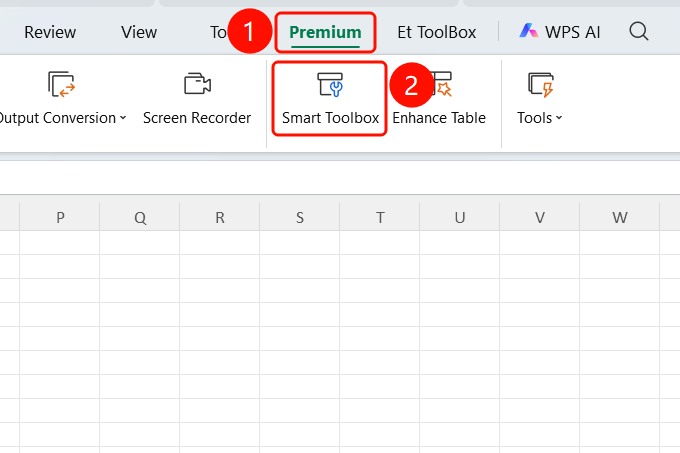
Feature Entry ①
"Premium" → "Smart Toolbox"
- Open a WPS Sheets document.
- Click the Premium tab on the top menu bar.
- Click the Smart Toolbox button.
- Enter the Smart Toolbox tab.
Tool Categories
Feature Entry
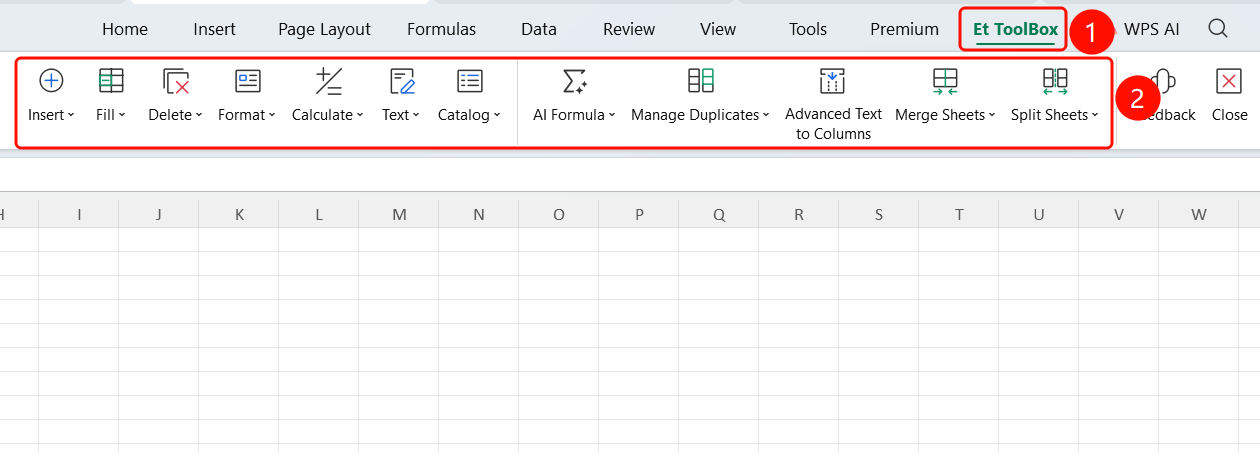
Smart Toolbox tab
- Insert: Insert text (to the beginning/middle/end), insert copied range, insert file hyperlink, insert diagonal header, and insert specified comment.
- Fill: Batch fill cell data.
- Delete: Batch delete blank rows, blank columns, etc.
- Format: Batch adjust cell formatting.
- Calculate: Batch calculation processing.
- Text: Batch text processing operations.
- Table of Contents: Generate a sheet table of contents.
- AI Formula: Generate formulas using natural language.
- Data Comparison: Compare difference data between two sheets.
- Advanced Text to Columns: Smart Text to Columns processing.
- Merge Sheets: Merge multiple sheets or workbooks.
- Split Sheets: Split sheets by conditions.
FAQ
Q1: Where is ET Smart Toolbox?
- Solution: Click the Premium tab at the top to find Smart Toolbox, or click the Smart Toolbox tab directly to enter.
Q2: What are the main features of Smart Toolbox?
- Solution: It integrates batch processing tools such as Insert, Fill, Delete, Format, Calculate, Text, Table of Contents, AI Formula, Data Comparison, Advanced Text to Columns, Merge Sheets, and Split Sheets.
Q3: Do I need a membership to use Smart Toolbox?
- Solution: You only need WPS Plus or Grand VIP to use all tool features.
Notes
- There is no limit on the number of times WPS Plus and Grand VIP members can use the ET Smart Toolbox feature.
- We recommend backing up your data first, as batch operations cannot be undone.
- Before using "Merge Sheets" or "Split Sheets", confirm that the source data formats are consistent.