Feature Summary
Digitally sign PDF documents with digital certificates to ensure document authenticity and integrity.
Feature Details
| Feature Dimension | Description |
|---|---|
| Subscription Limit | Requires subscribing to membership |
| Version Limit | No version limits |
Steps
Use Certificate Signature
Feature Entry
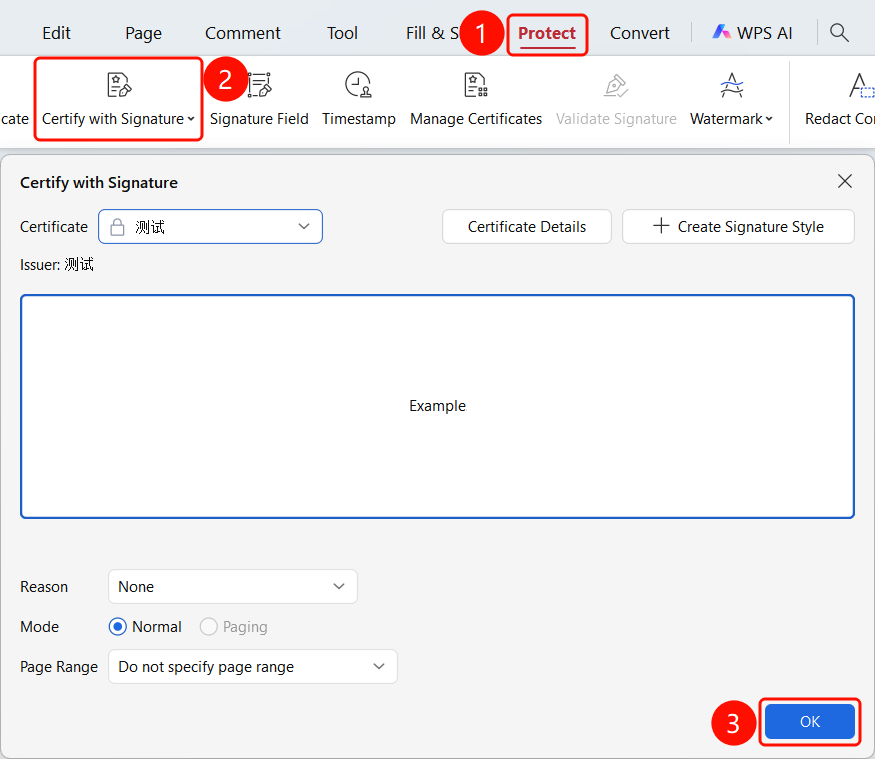
Protect tab > Certificate Signature dropdown menu
- Open the PDF file you want to sign.
- Click the Protect tab in the top ribbon.
- Click Certificate Signature in the ribbon.
- Click to use an existing certificate or create a new certificate for signing.
FAQ
Question 1: What is the purpose of certificate signature?
- Solution: Certificate signature proves document authenticity and ensures the document has not been tampered with.
Question 2: Can I edit the document after signing?
- Solution: Editing the document will invalidate the signature, and you will need to sign it again.
Question 3: How do I create a signing certificate?
- Solution: Click Create Signature and follow the wizard steps to create a new signing certificate.
Notes
- Certificate signature requires a valid digital certificate.
- Do not edit the document content after signing.
- We recommend completing all editing before signing.