Feature Summary
Manage digital certificates in PDF documents, including signing certificates, encryption certificates, and trusted certificates.
Feature Description
| Feature Dimension | Description |
|---|---|
| Subscription Restriction | Subscription required |
| Version Restriction | No version restriction |
Steps
Certificate Management Feature
Feature Entry
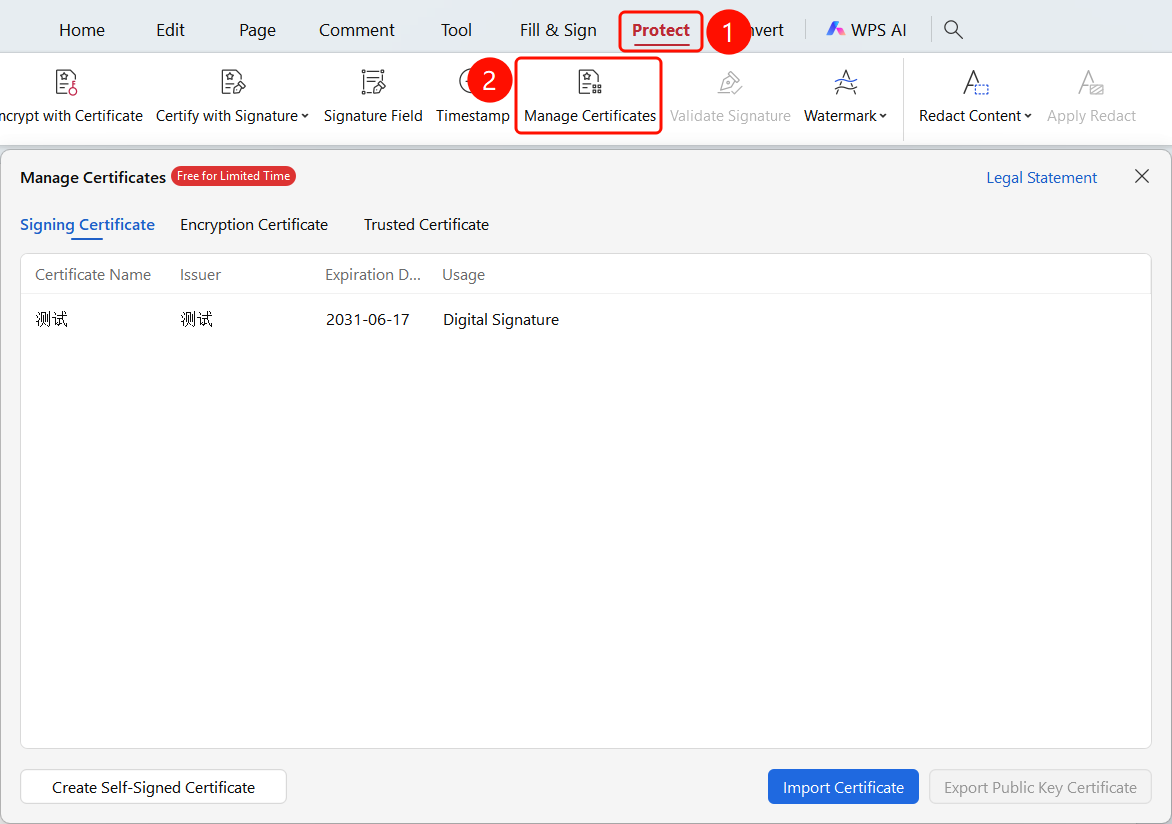
Protect tab > Certificate Management button
- Open the PDF file for which you want to manage certificates.
- Click the Protect tab in the top ribbon.
- Click the Certificate Management button in the ribbon.
FAQ
Question 1: What certificates can be managed using Certificate Management?
- Solution: You can manage signing certificates, encryption certificates, and trusted certificates.
Question 2: How do I import a certificate?
- Solution: Click the Import button in the Certificate Management interface, and select the certificate file to import.
Question 3: How do I delete a certificate?
- Solution: Select the certificate in the certificate list, and click the Delete button.
Notes
- Keep your certificate files and passwords secure.
- Expired certificates cannot be used for signing or encryption.
- We recommend backing up important certificates regularly.